


Computer and Adaptive Aids
Welcome to the Computer Aids Page, where you can find the right type of computers, software and accessories to suite your needs.
In these modern times Computers are an essential piece of equipment for most people, but they are even more important Assistive Devices for persons with disabilities, including persons with Mobility Impairments.
With the advent of the Internet and the multitude of businesses supported online, one’s imagination is the only limit. You can do just about anything from your home computer, including operating a business, doing research, socializing, listening to music, watching TV, movies, playing games, reading books, purchasing products, doing banking and taking part in discussions.
Many persons with Mobility Impairments turn to computers to assist them in the tasks mentioned above and there are a number of Assistive Devices & adaptions available to purchase which make almost any computer accessible for anyone to use.
To find out more about these Computers, Electronic Aids and Assistive Devices and the companies or organizations that provide them, please read the article below OR click on the shortcut links provided alongside.
What Are You Looking For?
Finding the Right Computer Aid for You: We Can Help
1. Choosing A Computer: Desktop I Laptop I Tablets
2. Choosing The Right Computer Accessories
A. Monitors
B. Keyboards and Alternatives
ii) Typing Without a Keyboard
– On Screen Keyboard
– Switch Input Buttons
– Eye and Head Tracking Systems
– Typing Sticks, Mouth Sticks and Head Pointers
C. Software and Accessories
– Voice Recognition Software
– Other Software
D. Mouse Alternatives
E. Accessibility Tools and Resources
– Disability Answer Desk
– Keyboard Shortcuts
– Mouse Keys

Finding the Right Computer Aid for You: We Can Help
Whether you know what type of Computer Aid you require but are looking for companies that supply them, or need information or advice on what is available, you are in the right place.
DiSA feature information on what is available and feature companies who sell Computer Aids including Edit Microsystems, as well as organisations such as QASA who donate certain Assistive Devices to its members.
Companies that specialise in providing products for people with physical impairments and should be able to advise you on the best type of Computer Aid or Software for you. They can also help set it up and operate correctly as well as service and repair the products that they sell should the need arise. Please see information about these companies listed below:

Edit Microsystems (Pty) Ltd is an award-winning company that is devoted to finding alternative and state-of-the-art technical solutions to improve curriculum delivery in educational institutions and effective communication in business with a focus on high-speed functional connectivity and on-going support.
They have a proud tradition of innovation and are on the cutting edge of technological advances in education. Many of their products are designed to enhance interactivity in a classroom or lecture theatre. Edit Microsystems are also a leader in finding and providing specially adapted hardware and software for Learners with Special Educational Needs throughout South Africa.
Contact: 086 111 3973
Head Office: 13 Boy De Goede Circle, Table View, Cape Town, 7441.
They also have branches in KwaZulu-Natal, Mpumalanga, Gauteng.
Website at: www.editmicro.co.za
Email them at: info@editmicro.co.za
QASA is a non-profit organisation (NPO 000-881) of Quadriplegics and Paraplegics in South Africa. QASA’s mission is “to improve lives by securing resources to advocate, educate, capacitate, support and mobilize”. QASA’s vision is that “all quadriplegics and paraplegics will live their lives to their full potential”. QASA develops products, programmes and services for quadriplegic and paraplegic members to build their capacity and ensure opportunities for societal integration and empowerment.
These projects include but are not limited to the Provision of Mobility & Assistive Devices:
Access to assistive devices is essential for persons with Mobility Impairments to improve independence and enhance quality of life for persons who have mobility impairments. QASA provides various assistive devices to Quadriplegics and Paraplegics to help them to operate their computers, including Speech/Voice Recognition Software, Typing Sticks and Mouth Sticks.
Speech/Voice Recognition Software is used to operate a device, perform commands, or write without having to use a keyboard, mouse, or press any buttons. Typing Sticks assists people with limited hand function to accurately type. It can be safely used on any type of keyboard without harming the keys, while a Mouth Stick is an assistive device that enables a person to perform activities like typing, pressing buttons, turning pages and even drawing with their mouth.
Read More: https://qasa.co.za/provision-of-mobility/
Click on the link above to find out more about the “Provision of Mobility & Assistive Devices” and how QASA assists persons with mobility impairments to acquire assistive devices such as “Voice Recognition Software” and “Typing Sticks”, or visit our Organizations – QASA Page to find out more about QASA and the other Projects and Services that they provide, or their website at www.qasa.co.za.
Blogs and Related Reading
How Windows Tools can change your life
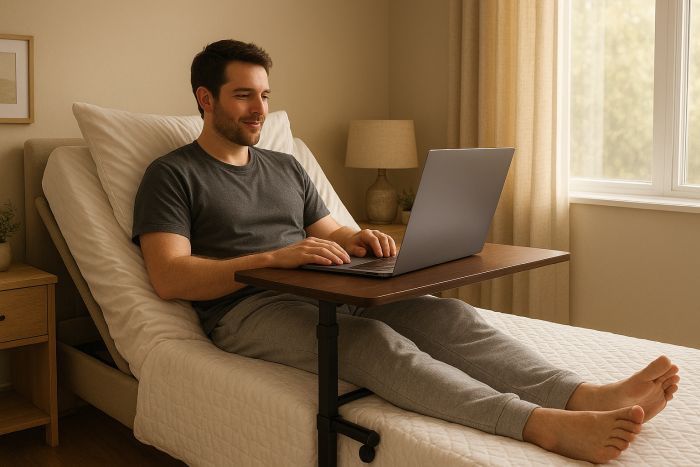
How Windows accessibility tools and AI can change the way you work, reduce strain, and restore independence.When your Bed Becomes Your Office
Accessible bed-based workstation solutions
1. Choosing the right type of Computer
Before purchasing a computer, you will need to decide whether you would require a Desktop, Laptop or Tablet. Each have their advantages and disadvantages, depending on your lifestyle, what they will be used for, type of impairment that you have; assistive devices that you will require to work the computer.
You would firstly need to look at the reason for purchasing a computer and then the advantages and benefits of both Desktops, Laptops and Tablet, which would then determine which one would suit your needs.
If you are struggling to decide which would be best suited for you, take a look at the advantages and disadvantages of each of these options below, to help you decide which to purchase, or find out more via the: Edit Microsystems Computer Buying Guide
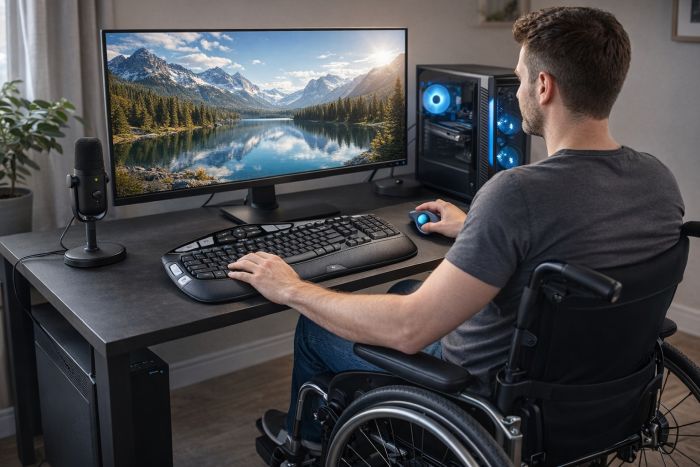
1.1 Benefits of Desktops
Desktop computers offer a variety of benefits, in that they are easier, and less expensive, to upgrade and are generally less expensive overall, so offer better overall value. They also offer more storage and memory at a lower price than laptops. They are highly upgradeable, allowing easy expansion of RAM, storage, graphics, and peripherals to extend lifespan and adapt to changing needs.
Click Here to Find out more about the benefits of Desktops.
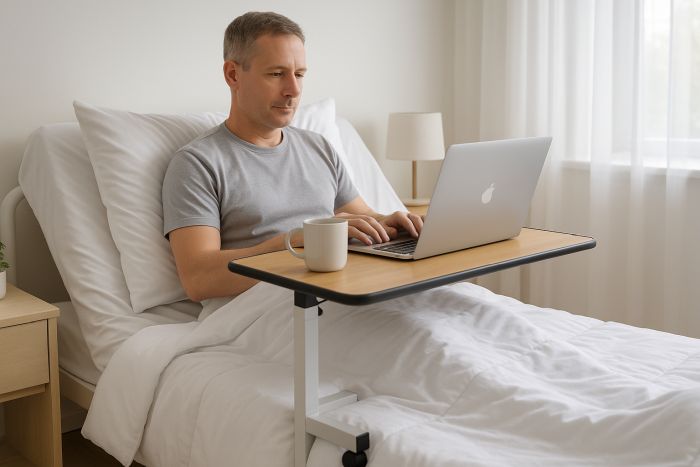
1.2 Benefits of Laptops
Laptops offer portability and flexibility, allowing people with physical impairments to work, learn, or communicate from different environments without being tied to a fixed setup.
Built-in accessibility features, lightweight designs, and compatibility with adaptive devices, laptops support greater independence and convenience.
Click Here to Find out more about the benefits of Desktops.
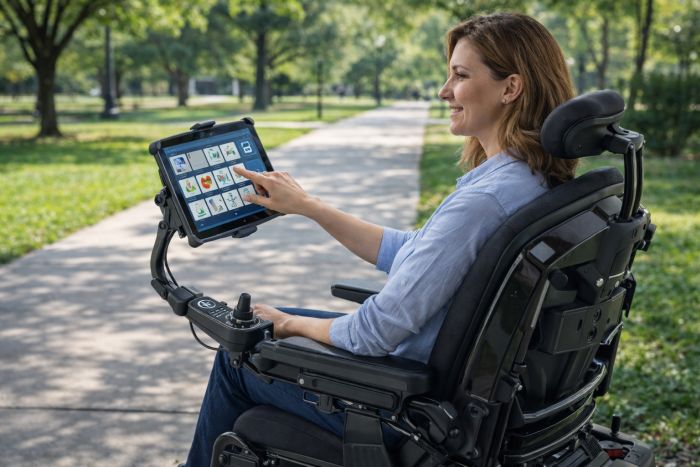
1.3 Benefits of Tablets
Tablets offer greater portability and ease of use, with touch-based interfaces that reduce the need for fine motor control compared to keyboards and mice.
Their lightweight design, adjustable mounting options, and accessibility features make them ideal for hands-free use and on-the-go independence for people with physical disabilities.
Click Here Find out more about the benefits of Tablets.
1.1. Desktop Computers

Desktop computers offer a variety of benefits, they not as portable as a laptops, but can be a more affordable and powerful option, with more features than Laptop computers, therefor ideal for a classroom, office or organisation. There are also a variety of other advantages that Desktops have over Laptop, which include:
– Desktop computers are easier, and less expensive, to upgrade.
– Desktop computers are generally less expensive overall and offer a better overall value.
– Desktop computers generally have larger monitors, which can also be connected to Laptops.
– Desktop computers have a lower risk of theft.
– Desktop computers have a more comfortable keyboard and a much easier to use mouse.
It should be noted that an aftermarket large, comfortable Keyboard and Mouse or Trackball, are also possible.
There are a variety of different types of Desktops available from various companies but there are advantages to purchasing your machine from companies like Edit Microsytems
Edit Microsytems can supply desktop computers from all brands to your unique specification requirements. If you know what you are looking for, you can send them your specifications and they will quote you. If you are unsure about your computing needs, you can contact them, so that one of their highly trained sales staff can assist you to find the ideal solution based on what you would like to use the computer for.
Contact Edit Microsytems, to find out more about these types of products or to receive a quote.
1.2. Laptop Computers
A Laptop, sometimes called a Notebook, is a portable personal computer, which has a Keyboard and screen that can be folded shut for transportation. Laptops are extremely useful for home, working while traveling or for people who have to spend time in bed or hospital and still need to work on their Laptops.
There are numerous advantages to a laptop, but essentially, the choice comes down to portability versus functionality and cost.
While desktop computers are less expensive, more powerful and more user-friendly, there is a lot to be said for being able to work, check emails, chat online, write papers and play video games anytime and anywhere you like. This is particularly true if you are a person with Mobility Impairments.
And besides, laptops these days are highly adaptable, one can easily purchase a more comfortable Keyboard, Mouse or Trackball, a larger monitor and/or an External Hard Drive to store and backup work if space is an issue.

On a Personal Note: I am a C5 Quadriplegic and use a Trackball and wireless keyboard, with “sticky keys”, “key board shortcuts” and “Numb Pad” for finer work.
I often battle with pressure sores and am sometimes laid up in bed for extended periods. I use an Adjustable Bed, which enables me to sit up enough to work in bed with my Laptop on an Over Bed Table, which means that there is no down time in my business.
I honestly consider my laptop to be one of my best buys.
1.3. Tablets and Mountings
Tablets offer many benefits for people with physical disabilities, particularly due to their portability, lightweight design, and touch-based interfaces, which can reduce reliance on keyboards and mice. They support a wide range of built-in accessibility features such as voice control, screen readers, switch access, and customizable touch settings, and can be easily mounted to wheelchairs or used hands-free. Tablets are also convenient for communication, navigation, and everyday tasks, promoting independence and flexibility in different environments.
However, tablets also have limitations compared to desktops or laptops. They typically offer less processing power, smaller screens, and limited multitasking, which can make complex work tasks more difficult. Upgradability is minimal, with fixed storage and memory, and some specialized adaptive software or peripherals may not be fully supported. For users requiring advanced computing, prolonged typing, or high-performance applications, desktops or laptops may provide a more comfortable and efficient long-term solution.

Examples of Tablets available include:
– Microsoft Surface: A tablet PC running Windows that can also function as a laptop when paired with a keyboard.
– Apple iPad Pro: While traditionally an iOS-based tablet, it offers powerful processing and multitasking capabilities, especially with a keyboard.
– Samsung Galaxy Tab: Android-based tablets that offer versatility in apps and connectivity.
Edit Microsystems can supply you with a wide range of pre-loaded software. Contact us for a list of Software Titles available as per your specific needs.
Key Features of a Tablet:
– Touchscreen Interface: The primary means of interaction is through touch, which makes tablets intuitive for many tasks like browsing, gaming, and drawing.
– Portability: Tablet PCs are usually lightweight and compact, making them easy to carry around.
– Operating System: They can run operating systems like Windows, Android, or iOS, which can offer compatibility with desktop software (in the case of Windows) or specialized tablet apps (such as those for Android or iOS).
– Built-in Battery: Tablets are typically battery-powered, offering hours of use without needing to be plugged into an outlet.
– Connectivity: Tablets generally come with Wi-Fi and optional mobile data (via cellular networks) for internet access.
– Optional Accessories: Many tablet PCs support accessories like keyboards, stands, and docking stations for a more laptop-like experience.

A Gooseneck mounting solution with a Universal Tablet Holder is a sturdy yet flexible system, with a wide range of adjustment, makes it easy to mount and position an iPad or Tablet on a table or wheelchair for optimum touch access.
The Gooseneck with Universal Tablet Holder allows an iPad or Tablet to be simply and securely clipped in place. It can be easily removed in a moment if required. Includes a flexible Gooseneck arm for easy positioning with a clamp that can fit round bars or a table edge.
The Universal Tablet Holder is a highly adjustable tablet holder for mounting any tablet from between 7” and 13″ with or without a case. The tablet mount works with Apple iPad and Samsung Galaxy tablets, It is easily adjustable with knobs and a 2.5 mm Allen key. The holding points secure the device with minimal contact so that all connections on the tablet remain accessible and the view of the display is clear.
Please note: although we cannot guarantee the safety of your iPad/Tablet/Case we do provide a one-year warranty on the Gooseneck with Universal Tablet Holder. iPad/Tablet/Case not included.
The Lever Universal Mounting System is a versatile and adjustable mounting solution designed to securely hold devices like tablets or communication tools in place. It features a multi-joint arm with clamps that attach to tables or desks, allowing for precise positioning and stability. Ideal for users with disabilities or special needs, it facilitates hands-free access and optimal device placement.
The Lever mounting systems enables easy handling of mounting challenges consisting of features that quickly release levers, with a standardized base interface and a universal plate connector. The Lever mounting system is user friendly and cost effective.
Features include:
– The Mount is flexible and durable to any sturdy base.
– Easy release levers
– Cost effective.
– User friendly.
Companies such as Edit Microsystems provide a variety these and other Tablets and Accessories. Please contact Edit Microsytems, to find out more about these types of products or to receive a quote, or Contact Us to see what other types of these products are available in South Africa.
2. Choosing The Right Computer Accessories
Choosing the right computer accessories for people with physical impairments involves matching tools to the user’s strength, mobility, and comfort needs. From ergonomic keyboards to adaptive mice and switch controls, the best choice is one that supports independence, reduces strain, and enhances everyday usability. Please click on the relevant categories listed below to find products that can assist which are available in South Africa.
A. Monitors
All computers comprise of a Monitor, whether they are Desktops or Laptops. A Monitor is an output device that displays information in pictorial form, it usually comprises the display device, circuitry, casing, and power supply. The display device in modern monitors is typically a thin film transistor liquid crystal display (TFT-LCD) with LED back lighting.
Touch screen Monitors are also available for certain types of software, particularly those that do not require pixel-accurate pointing. These monitors use touching of the screen as an input method, items can be selected or moved with a finger, and finger gestures may be used to convey commands. The screen will need frequent cleaning due to image degradation from fingerprints.
There are a variety of different types of Monitors available on the market today, from a diversity of sources. Edit Microsytems also supplies LCD and LED monitors in a wide range of sizes and connectivity options. Their monitor range includes touch screen monitors for special education needs. Contact Edit Microsytems, to find out more about these types of products or to receive a quote.
B. Keyboards & Alternatives
Standard keyboards and a mice are functional ways of interacting with your computer and increasingly other devices like tablets. However, these standard devices can pose difficulties for many people, especially those users with physical, sensory, or cognitive challenges. There are lots of other options available. Being physically comfortable when using your technology is extremely important and extends beyond having a keyboard or mouse that is comfortable to use.
Poor-posture, over-stretching or discomfort can result in aggravating existing conditions or in developing longer-term issues such as Repetitive Strain injuries (RSI’s). Good posture and comfortable working is important for everyone and finding something that works for you is obviously more important in preventing problems than in reaction to them.
The standard computer keyboard is designed to be used with two hands and has a number pad on the right-hand side, which obviously favours right-handed people. Fret not, there are numerous alternatives to the standard keyboard available on the market today including:
i. Ergonomic Keyboards

Ergonomic Keyboard are designed to promote a better typing position for your hands and wrists and therefore reduce the chance of strains and discomfort that can ultimately lead to significant issues such as Repetitive Strain Injuries (RSI). Ergonomic keyboards ‘split’ the keyboard in two, placing each half on a curve so your arms are at a more comfortable, relaxed angle when typing.
Some ergonomic keyboards are on a fixed curve. On others, the two halves are hinged in the middle so the angle can be adjusted. On others, the two halves are completely separate and only joined by a connecting wire.
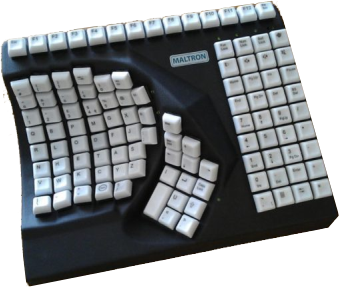
More contoured Keyboards are a further development of the split concept. These place the finger keys into two cupped depressions at shoulder width, with function keys set in-between for use with the thumbs. These fully ergonomic keyboards require very little movement of the arms and wrists and are designed to reduce the risk of RSI. Similar keyboards (with a non-QWERTY layout) are also available for single-handed users, for either left or right-handed use.
An example of these specialised Keyboards, available from Edit Microsystems, is:
ii. Keyboards with Large Key
Keyboards with larger keys (like BigKeys and Jumbo Keyboards) are specifically designed to aid people with visual and mobility impairments navigate the board.
Options are also available with upper- or lower-case layouts.
There is a variety of different types of large key Keyboards available on the market today, including the Jumbo XL featured below, which is available from companies like Edit Microsystems.
To learn more about Computer Aids for persons with visual impairments, please visit our Visual Impairments section.

iii. High-Contrast Keyboards
High visibility keyboards use high-contrast colours to make the keys easier to locate.
There are many different colour combinations with either the keys or the letters as the ‘stand-out’ colour (eg. yellow on black, black on yellow, black on white, white on black).
There are various types of High Contrast Keyboards available on the market today – including those featured below, which are available from Edit Microsystems.
To learn more about Computer Aids for persons with visual impairments, please visit our Visual Impairments section.

The black and white Clevy Contrast Keyboard has been developed in close cooperation with various low vision experts.
This keyboard provides a better contrast than the colored version, making it even more useful for the visually impaired.
Please contact Edit Microsytems, to find out more about this product or to receive a quote.
iv. Early Learning Keyboard
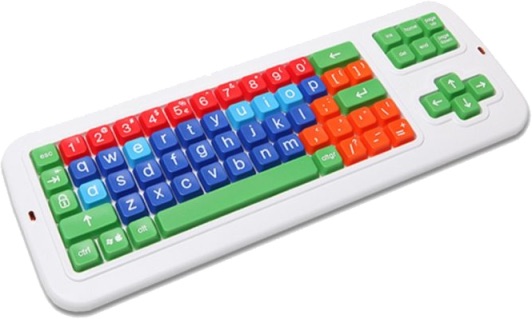
Early Learning Keyboards have a simple layout. They have no function keys, and are Ideal as an introduction to keyboarding, connecting via USB or PS2 connections. Below are a few examples of Early Learning Keyboards, available from Edit Microsystems:
Accuratus Monster 2 – Early Learning Keyboard with Large Keys
For young children the Monster 2 Early learner (pictured right) is the perfect entry into computing, with large oversized keys grouped in different colours and a special printed case making learning easy and fun. The monster 2 also has a detachable wrist pad to make the early stages of typing much easier. The keyboard layout is based on a standard UK keyboard layout so when a child grows up and progresses to an adult board the keys will be in all the normal places.

v. Smaller, Compact Keyboards
Compact keyboards, as their name suggests, are smaller keyboards. The actual key sizes are quite similar to a standard laptop keyboard and, like a laptop, space is saved by removing the number pad (this can be separate, or some have one that slides out when needed).
A compact keyboard frees-up desk space and allows you to bring your mouse (or the other things you need) closer to your centreline, which helps to reduce over-extending. As they are smaller, compact keyboards can fit more easily between the arms of a wheelchair and are often more comfortable to use for single-handed users. An example of a smaller Compact keyboard is the Accuratus K82D Featured below:

Accuratus K82D Mini Scissor Key Keyboard
The Accuratus K82D: USB Premium Mini Scissor Key Keyboard with Trackball is specially designed for meeting high spec requirements. Boasting one of the smallest footprints out of all Accuratus keyboards, the K82D is perfect for situations where space saving is essential. The keys on this keyboard are scissor key design, giving you a very soft and tactile touch for hours of comfortable typing.
vi. Keyguards and Other Specialist Keyboards
There are a wide variety of different types of Keyguards and specialist keyboards that can assist persons with disabilities, including persons with Mobility Impairments. Keyguards are rigid plates with holes designed to work with specific keyboards. The holes are positioned over each key and significantly reduce the chance of accidental keypresses. The guard also allows you to rest your hands and arms on the guard without pressing any of the keys. Guards can be removed and fitted for use only when required. It is usually easier to purchase a keyboard and guard together rather than trying to get a guard to fit a specific keyboard.
Various types of these Keyguards are available from companies in South Africa, such as Edit Microsystems who sell the following products:

Ideal for people with temporary or permanent motor skill difficulties, the Clevy Keyguard is a valuable addition to the Clevy Keyboard selection. The Clevy Keyguard enables users with motor skill difficulties to let their hands rest on the keyboard without unwantedly hitting any keys – and guides the user’s fingers towards the right keys.
The surface of the Keyguard has been matted to make its appearance calmer to the eyes, prevent reflecting light from causing any flickering.
The Clevy Keyguard fits all current models of the Clevy Keyboard, so you can use the same keyguard for the coloured, contrast and wireless models.
Contact Edit Microsytems, to find out more about these types of products or to receive a quote.
This keyboard was initially designed for Persons with Cerebral Palsy in mind, The Maltron expanded keyboard (pictured right) is designed to provide better access for physically disabled and visually impaired users. A metal keyguard helps to prevent accidental key presses and protects against any impact damage. It is robustly designed with a strong steel construction to withstand heavy use, and has a smooth wipe-clean surface. The keyboard may also be placed on the floor or fixed at the foot of a bed to be used by toes.
This keyboard can be configured by the user to support QWERTY (US English layout) or FOU (Frequency of Use) Letter layouts. The FOU layout may be selected by a special key combination and places the most commonly used keys in a central position on the keyboard, which reduces hand or foot movement to a minimum. The key tops are easily relocated to support either layout by taking off the top cover. Layout diagrams are included in the handbook. Supplied set up with QWERTY (Default) or FOU layout as requested.
The large surface area (62cm x 23cm) and built in keyguard are designed to reduce keyboard errors, enabling a higher work rate as a result of more accurate typing and data input. It has a USB connector with an in-line 5-pin DIN type snap-connector. The snap-connector is designed to separate if the connector cable is accidentally pulled tight, thereby helping to prevent damage to the keyboard or computer. It has large, clear characters and key labels – black on white for alphanumeric and cursor keys, black on pink for function keys and black on yellow for control keys (alternative options are available if required).
An audio-visual feedback system for the Expanded Keyboard can also be selected as a purchase option which will enable the Maltron Expanded Keyboard to “beep” and show a light whenever a key is correctly pressed. The feature may be turned on or off as desired and may be particularly useful for people with cerebral palsy (CP) who will not need to focus on the keyboard to confirm if a key has been pressed correctly. These keyboards are available to purchase from companies such as Edit Microsytems, please contact them to find out more about the features it offers, or to receive a quote.
There are also various other types of these products which are available from companies such as Edit Microsystems, Maltron also produce a keyboard for people with no use of their hands. The head /mouth stick keyboard has a shape and layout to match natural head movement and minimise the amount of movement needed from the stick.
Typing Without A Keyboard
As mentioned above, you do not have to use a physical keyboard to control or type on your computer, tablet or smartphone.There are a variety of possible alternatives, including using:
i. On-Screen Keyboard
On-screen keyboards are the way most people now type on tablets and smartphones but are also standard features on most operating systems. Letters can be selected using a touchscreen, a mouse, a switch, or a joystick. Touchscreens use sensors in the screen to track movement and selections and are a very direct and method of interacting with your device.
Tablets and smartphones use touchscreens as well as many laptops. Touchscreen monitors are also available for use with desktop computers. Touch screen Monitors are also available for certain types of software, particularly those that do not require pixel-accurate pointing.
These monitors use touching of the screen as an input method, items can be selected or moved with a finger, and finger gestures may be used to convey commands. The screen will need frequent cleaning due to image degradation from fingerprints.
There are several types available, but you should try to avoid using ‘add on’ touch-screens such as those that fasten over your standard monitor, as these devices lack the accuracy and robustness of modern touch monitors and can cause problems as some learners are more interested in trying to pull them off than using them appropriately. There are a variety of different types of Monitors which are available from various companies in South Africa, such as:
ii. Switch Input Buttons
Switch Input Buttons sends a signal to the computer when activated, the switch can also be replaced with a sensor that detects an eye blink, a puff down a tube or any reliable body movement. An on-screen keyboard, word or pictogram board is used to highlight rows, columns or groups, gradually narrowing-down a selection with each activation of the switch until the desired word or letter is the last option left. Switches work well with cause and effect programmes that require simple choices but are in no means limited to this; skilled operators have few restrictions to what they can do. These types of products are available from various companies in South Africa, including Edit Microsystems who sell the following products:

iii. Eye and Head Tracking Systems
Eye Tracking and Head Tracking systems both operate an onscreen keyboard using the mouse. These devices were initially designed for use by people with very limited movement, eye tracking hardware and software is now relatively inexpensive and can present an interesting alternative for people experiencing temporary or situational disabilities; for example, a parent could hold their baby and still be able to interact with their computer.
enPathia is an accessible computer control system which enables simple computer access for people with limited mobility. The enPathia was designed as a head mouse but can also be used by other body parts such as forearms or feet. It is an application to simulate virtual mouse clicks and provide a user- friendly experience of using the body as a navigation tool.
The enPathia is best suited for persons with conditions such as multiple sclerosis, tetraplegia, spina bifida and brain paralysis, enabling a versatile and easy system to learn.
Features include: Alternative mouse device for computer navigation,
Allowing the cursor to move in the direction indicated by the user;
Allows the user to control the computer by performing gentle and natural movements;
enPathia allows for creating documents and writing text, navigating files and folders, browse the web and play.
Available from: Edit Microsytems
The PCEye is the newest generation of lightweight, versatile eye trackers designed to be used with a Windows laptop or computer. It is designed for both those just getting started with eye tracking as well as for those with advanced eye gaze skills.
For individuals without the ability to use their hands or fingers, eye tracking is the quickest, easiest, and most ergonomic way to operate a computer.
The PCEye lets you surf the web, connect with friends online, play games, Skype, turn on the lights or TV, and even create documents using only your eyes.

C. Software and Accessories
Choosing the right computer accessories for people with physical impairments involves matching tools to the user’s strength, mobility, and comfort needs. From ergonomic keyboards to adaptive mice and switch controls, the best choice is one that supports independence, reduces strain, and enhances everyday usability. Please click on the relevant categories listed below to find products that can assist which are available in South Africa.
Voice Recognition | Speech-To-Text Software
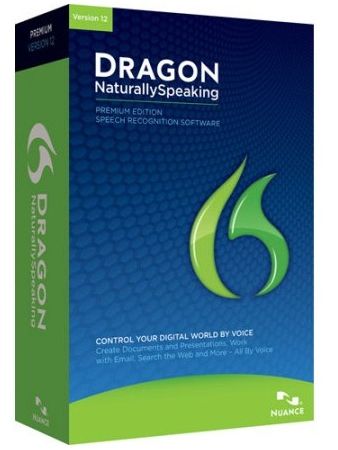
Voice/Speech-Recognition Software enable you to run your computer entirely with your voice, it converts speech to text, and allows users to perform commands and even move the mouse without touching anything. Voice recognition is a practical way of controlling your computer and a very efficient means of getting information down and is useful for people who find typing difficult, painful or impossible, such as someone who has a physical disability, but it can also by-pass issues with things like spelling or grammar and so can be a great help to people with learning differences like dyslexia.
There are a variety of options available including a free one that comes with windows and Dragon Naturally Speaking (also known as Dragon for PC). This speech recognition software package, runs on Windows personal computers . It requires quite a bit of RAM (Random Access Memory) to run well and the right microphone.
This and a variety of similar Speech/Voice Recognition Software is available from companies such as Edit Microsytems
i. Microphones, Speakers and Headsets
There are many different microphones that work well with Voice/Speech-Recognition Software, but the better microphone results in better accuracy.
The person using it, talks into a mike and the words are then translated into text. After you set it up, it provides a Tips function, which you can leave on for a while so you keep learning tricks every time you start the software.
You will also need to train it to learn and understand your voice. If used correctly, it should improve every time you use it.
Your voice, how you use the microphone, your environment, and your PC are a few of the variables that determine what is a good microphone for you, the same applies to the microphones you will find comfortable, it is a personal preference.
The Microphones vary in type and price and include:
– Basic headsets and mike
– Cordless headsets and mike
– USB headsets and mikes
– Microphones mounted on a desk.
Each type has its pros and cons, and each are available from Edit Microsytems, who sell a variety of products including those listed below. Edit Microsytems also provides a variety of other portable headsets which allow you to engage in a variety of activities anywhere anytime.

Are robust headphones with replaceable parts, designed especially for schools. Easi-Headphones are a durable alternative for ICT suites and have a robust headband and replaceable ear cushions, which make them last even longer.
The replaceable ear cushions have been designed to cover the whole ear to minimise outside noise and to increase comfort and the cable is quick release to reduce strain.
Available from: Edit Microsytems
Edit Microsystems also provide a variety of other Headset- Speakers and Microphone devices to suit your needs, including various portable headsets which allow you to engage in a variety of activities anywhere anytime. They include the:

Snuggly Rascals are volume limited headphones, with flat speakers encased in a super soft fleece over ear headband with Velcro adjustment. You can choose from a few colorful and engaging designs:- (colors change constantly and are subject to availability).
– Monster (Green)
– Unicorn (Pink)
– Penguin (Black)
Features include Super soft fleece headband with flat over ear speakers; Lightweight – only 50g; Velcro size adjustable headband to fit circumference 38cm to 58cm; Volume limited to 85 decibels; Headband is machine washable at low temperatures (with speakers removed).
Available in three designs: Monster (Green), Unicorn (Pink) or Penguin (Black); Languages on packaging: English, French, German, Dutch, Italian, Spanish and Portuguese.
Available from: Edit Microsytems
Other Types Of Software
There is also a wide variety of other types of Software available on the market today, available to purchase from Companies such as Edit Microsystems.
They supply a wide range of pre-loaded software, including Microsoft Windows and Office, as well as various other programs specifically designed to assist persons with Mobility Impairments to operate a computer and type easily, such as:
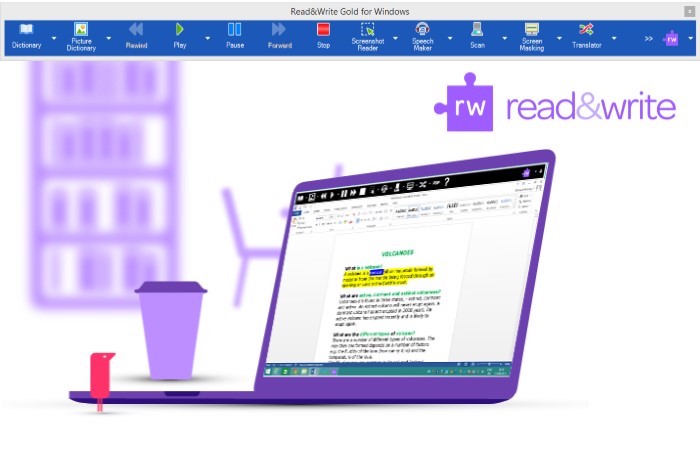
The TextHelp Read and Write Gold literacy Software for Dyslexia and Reading Difficulty is used by students and professionals around to world to assist them to overcome barriers to reading and writing.
The toolbar supports individuals who struggle with literacy difficulties (including, but not limited to dyslexia).
The toolbar can also be useful to students with English as a second language, or even just for proof reading and productivity. TextHELP Read&Write Gold is a discrete, easily customisable toolbar that that integrates reading, writing, studying, and research support tools with common applications such as Microsoft Word and internet browsers.
Read and Write Gold is suitable for your PC, Mac or iPad and is even available as a moblile flash stick application to be used on public use computers.
Benefits of TextHELP Read and Write Gold include:
– Assists with reading fluency and comprehension;
– The software facilitates research, writing, studying, and test taking;
– The toolbar integrates with commonly used mainstream applications such as Microsoft Office;
– Encourages independence and inclusion in an inclusive education environment.
The Product Features include:
Spell Checker; Word Prediction; Dictionary; Picture Dictionary; Word Wizard; Sounds like and Confusable words; Verb Checker; Calculator; Screenshot Reader; Speech Maker; Daisy Reader; Pronunciation Tutor; Scan: OCR/Scan a paper document to PDF, Word, HTML or ePub format; Fact Finder; Fact Folder; Fact Mapper; Screen Masking; Speech Input; Translator: You must be online to use this feature; PDF Aloud; Study Skills; Word Cloud and Voice Note.
The scanning and PDF aloud features of Read and Write Gold have made it highly popular as an exam reader. Students no longer need to have the question paper read aloud to them by a scribe or assistant, but can rather independently listen to the questions and have them repeated as necessary without having to ask for assistance. This feature has given dyslexic students around the world confidence and independence.
Contact Edit Microsytems to find out more about this Software and to receive a quote.

Clicker 8 is the complete writing solution for the primary and SEN classroom, providing every pupil with just the right level of support and challenge. In addition to enhancing the core Clicker features that teachers know and love, Crick Software have added Clicker Cloze, Clicker Analytics, Picturize, and so much more! Clicker 8 combines exciting new feature ideas from Clicker fans with the inclusive literacy support tools already known and loved. What’s new in Clicker 8?
Clicker 8 builds on the worldwide success of its award-winning predecessors.
It’s inclusive, it’s engaging, it’s intuitive, and it enables teachers to give every learner the personalised, evidence-led support they need to take their literacy skills to the next level.
Cloze activities are many a teacher’s go-to resource for comprehension exercises. They’re also fantastic for developing core reading and language skills. With Clicker Cloze, you can create a cloze activity using any text in just a few seconds.
Complete within Clicker or print out for use away from the computer.
Contact Edit Microsytems to find out more about this Software and to receive a quote. Edit Microsystems can also supply software such as Clicker 6 program for Primary schools and Yenka for high schools. Please feel free to Contact Us for more information.
D. Mouse Alternatives
The regular Mice/Mouse which is purchased and used with most computers can be difficult to use by young children and persons with Mobility Impairments who have limited use of their hands, including persons with Arthritis and persons with carpal tunnel syndrome.
Trackballs and some other mouse alternatives are also handy when desk space is at a premium and are also easier to use and require less overall effort. They are recommended if you are already suffering from carpal tunnel syndrome and experience pain when moving your forearm.
There are many different types of Alternative Mice/Mouse available, depending on your disability, impairment, or difficulty. It is important to choose one that fits the hand well, feels comfortable and is easy to use, it often takes a little while to get used to using a new type of mouse and can feel a little clumsy at first. Alternatives to the standard mouse include:
i. Ergonomic Mouse
Ergonomic Mice have been designed to reduce muscle strain and decrease discomfort (while using the mouse) associated with a injuries such as carpal tunnel syndrome, arthritis, and tendonitis. Compared to other mice, an Ergonomic Mouse is designed to fit a more natural hand position when being used.
Ergonomic Mice often come in left- and right-handed orientations and in different sizes, to ensure the mouse fits comfortably.
Vertical mice realigning the wrist to a more natural ‘handshake’ position, transferring movement onto the more powerful shoulder muscles.
Adjustable Ergonomic mice are hinged along one side and allow for the mouse to alternate between a flatter more traditional position and the vertical, this encourages a variable wrist position and can help move from a normal mouse to a vertical.
ii. Rollball Mouse
Roll Bar Mice are positioned directly in front of the keyboard and have a ‘bar’ that slides left and right and rolls for up and down movement, eliminating the need to reach for the mouse and reducing unnecessary wrist movements, which can stress your neck, shoulders and elbows. Many of these Roll Bar mice include handy shortcut buttons including double click and copy and paste.
The position of the bar allows it to be operated with your thumbs and keeps your hands on or close to the keyboard. There are various types of these products which are available from companies in South Africa.
iii. Trackball / Roller Ball Mouse
A Trackball or Rollerball Mouse remains stationary with the cursor controlled by rolling a ball with your thumb, fingers, palm, or back of the hand. There is therefor little to no wrist movement, which is ideal for persons with limited hand function who battle to use both the regular Mouse which is sold with a Desktop Computer, or the Mouse Pad used with a Laptop.
A Trackball is basically an upside-down mouse with an exposed protruding ball, which is used to move the pointer. The Trackball has no limits on effective travel and the operator just continues rolling, whereas a mouse would have to be lifted and re-positioned.
Some Trackballs have notably low friction, as well as being made of dense material such as glass, so that they can be spun to make them coast.
The Trackball’s buttons may be differently situated to that of a typical mouse and you get a variety of different types and styles of Trackballs, including cordless ones, which can be handy.
You will need to find one that suits your needs and pocket, as the Trackball is generally more expensive than the normal mouse and more difficult to find in South Africa.
Trackballs are however available from companies such as Edit Microsystems, who also sell some of the following products:
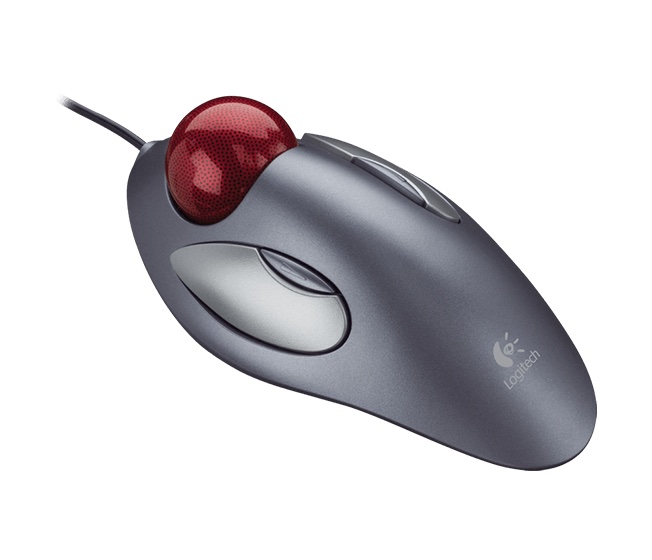
The Logitech Trackman Marble Mouse (pictured at top) has a sleek ambidextrous design that fits either hand comfortably and stays in one place, therefore allowing the user to move the cursor without moving your arm.
Thanks to the large Marble trackball and advanced optical technology, the TrackMan Marble provides smooth tracking and superior precision. The convenient controls allow moving quickly between documents or browsing your favorite Web sites easily with the large, easy-to-reach Back/Forward buttons.
There is zero setup required, it has a flexible wired connectivity, which means that you just plug the cable into your USB or PS/2 port and it works right out of the box. The programmable controls allow you to configure the buttons to do exactly what you want like switching applications, opening browser windows or jump to full screen while watching videos .
The Logitech Trackman Marble Mouse is available from various companies in South Africa, Contact Us to find out more, or click the Read More link to find out more about this product.
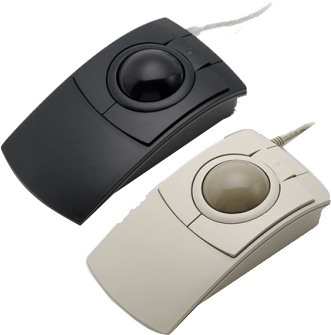
The Microspeed PC-TRAC/MAX-TRAC is a three button trackball. The trackball (pictured right) includes a low profile case acting like a natureal hand rest and reduces wrist angle by mirroring the natural contour of the hand.
It is user friendly and affordable and is Microsoft compatible. It is easy to plug into your computer through the USB port and the drag lock feature allows for a simple press and the drag button locked until you press a second time. It is supplied with a USB connector with a USB port to your computer and is available in colours black and grey.
Contact Edit Microsytems to find out more about these products and to receive a quote.
Edit Microsystems also provide a variety of other Trackballs which allow you to operate computers easier, contact Edit Microsytems, to find out more about these types of products or to receive a quote, or Contact Us to see what other types of these products are available in South Africa if Edit Microsytems cannot assist you.
iv. Large Trackball Mice
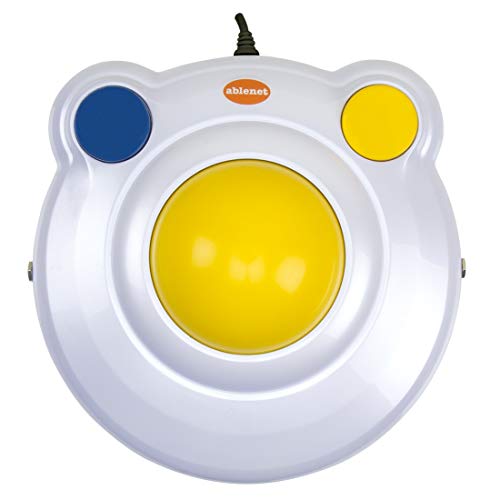
The Large Trackball Mice are easy to use and may be particularly helpful for users who lack fine motor skills, including children and people with limited hand use, learning difficulties, tremors or arthritis. Also, like the BIGtrack mouse (with switches) shown here, they can be strong and are often suitable for being operated by elbows or feet.
These Large Trackballs can be used for easy precision. The large ball requires less fine motor control than a standard trackball and it is ruggedly built.
This was the first type of Trackball that I used after injury and gave me good practice to eventually use a normal trackball.
These large Trackballs are cheaper than normal Trackballs and are available from companies in South Africa, such as Edit Microsystems who sell the following products:
v. Touchpads
Touchpads (or Trackpads) are stationary pads operated by sliding (or swiping) your finger(s) across the surface; clicking can be done with buttons or by downwards pressure / tapping lightly on the surface. These types of products are available from various companies in South Africa, including Edit Microsytems who sell the following products:

The Glidepoint USB Touchpad is an alternate to a standard mousing device which allows you to simply glide your finger over the surface and tap it gently or click the buttons to perform all input functions. There are 3 categories of desktop touchpads to choose from finding a solution to fit your digital lifestyle.
The Glidepoint USB Touchpad enables easy and comfortable navigation to your computer forming basic mouse functions – glide, point, press and tap to activate the designated areas of the pad. The change of pad texture and colour feature allows for easy right click detection by double tapping and holding your finger on the pad.
The GlideExtend feature enables easy movement of the cursor after you have run into the touchpad’s edge. The one touch, zoom and scroll with distinctive sounds for each operation combining all the mouse functions into one durable touchpad. The programmable software allows you to go from fast on-screen movements to pixel point control. Quickly activate vertical/horizontal scrolling as well as magnification tools by gliding a finger along the touchpad edges. Cirque’s capacitive touch technology provides complete navigation control of any graphical interface, packed in a space saving, low friction, durable touchpad.
Contact Edit Microsytems to find out more about these products and to receive a quote.
Edit Microsytems also provide a variety of other Joysticks which allow you to operate computers with greater ease. Contact Edit Microsytems, to find out more, or Contact Us to see what other types of these products are available in South Africa if Edit Microsytems cannot assist you.
vi. Joysticks
Joysticks work in a similar manner to the controls on an electric wheelchair, with the joystick position determining the direction (and speed) of the mouse pointer.
Additional buttons on the joystick can operate left, right and double clicks, as well as other common shortcuts such as cut and paste.
These types of products are available from various companies in South Africa, including Edit Microsystems who sell the following products:
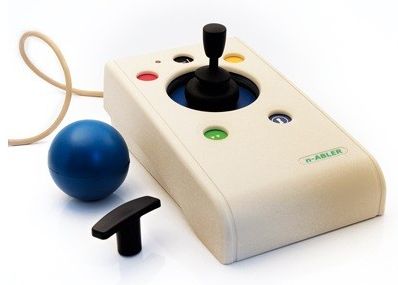
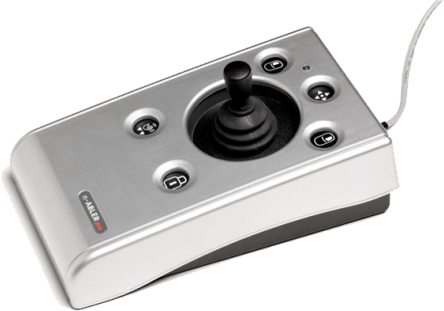
The N-Abler Pro Joystick is alternate to a standard mouse device designed specifically for users with motor skill difficulties and limited hand mobility, involuntary muscle spasms and hand or wrist tremors, poor hand-eye-coordination, limited manual dexterity.
Using the n-ABLER Pro Joystick could reduce wrist and elbow fatigue resulting in a more controllable fingertip grip. It is suitable for users of all age groups with mobility and motor skills difficulties and those who use the computer for long periods. The symmetrical design allows users to work with the right or left hand and the integrated palm and hand rest enables work posture to be more relaxed.
The N-Abler Pro Joystick reduces tension and strain and has a large footprint for maximum stability with tough an ergonomic design. The light touch joystick allows for easy navigation, including T-Bar handles for adjustable joystick grips and soft ball. It has an easy cursor control and all buttons have white legends on black backgrounds for easy identification of button functions. It consist of double click and latching drag lock buttons; Switchable left and right click buttons; it is switchable to mute and visual warnings indicating selection or change of function. It has an Anti-tremor button (with three settings to compensate for the degree of tremor) to improve cursor control.
The Cursor Speed can also be controlled with no additional drivers required for easy plug and play installation. The Dimensions are: 23.3 x 13.3 x 12.8cm and it includes an n-ABLER Pro Joystick USB.
Contact Edit Microsytems to find out more about these products
Arguably the most adaptable alternative mouse device on the market, designed to address the needs of computer users with limited hand control, motor skill difficulties, poor hand-eye co-ordination, lack of manual dexterity and involuntary muscle spasms.
The joystick’s large trackball requires only a light touch, which, together with the function buttons it makes for easy navigation and manipulation of objects on the screen. It only needs minimal hand movement to operate, reducing elbow and wrist fatigue and the symmetrical design allows for left or right-handed use.
Features of the n-ABLER includes switchable left and right click buttons; Rugged construction; Large footprint for stability; Double-click and latching drag lock buttons; X-Y axis lock and scroll button; easy ‘plug and play’ installation; Cursor Speed Control and Mac or PC compatible.
Contact Edit Microsytems to find out more
Edit Microsytems also provide a variety of other Joysticks which allow you to operate computers with greater ease. Contact Edit Microsytems, to find out more, or Contact Us to see what other types of these products are available in South Africa if Edit Microsytems cannot assist you.
vii. Pen Mice, Graphics Tablets and Foot Mouse
There are also various other options to controlling your computer, including a Pen Mice, Graphic Tablets, the Foot Mouse and the GlassOuse.
a. Pen Mice
Pen mice are held in the hand like a pen. They tend to be quite ‘chunky’ sand are a similar size to a marker pen. Left and right click buttons are vertical on the pen shaft. There are various types of these products which are available from companies in South Africa, Contact Us to find out more.
b. Graphics Tablet
Graphics Tablets require a specialist tablet to write on, but the pens they use are more pen-like than pen mice and generally more comfortable to hold. Graphics tablets tend to be more geared towards design than ergonomics.
Many tablet manufacturers are beginning to produce a pen or ‘stylus’ as another means of interacting with the tablet and will allow you to make handwritten notes. There are various types of these products which are available from companies in South Africa, Contact Us to find out more.
The Foot Mouse systems are typically designed to use both feet. One foot controls the cursor using a slip-on puck on a mat. The other foot controls switches, often with single and double click or other options controlled by separate buttons.
There are various types of these products which are available from companies in South Africa, Contact Us to find out more.
Mouse Keys allows you to move the mouse cursor from the keys in the number pad on the right side of a full-size keyboard. It is not as fast as a regular mouse, or even as fast as the Track Ball, but when turned on, Mouse Keys also allows you to click and drag.
This gives you much more control, especially in Graphic Design and if your hand movement is impaired.
To turn on the Mouse Keys option, click Start; Settings; Control Panel; Accessibility Options.
Click the Mouse Tab at the top of the dialog box and then click the little box next to Use Mouse Keys to put a check in it.
You can then select the options you want and click OK.
You can also turn on Mouse Keys by pressing Left Alt+Left Shift+Num Lock.
To change options like how quickly the mouse pointer moves and whether your PC makes a sound when you turn on Mouse Keys, in the Ease of Access Center, tap or click Make the mouse easier to use, and then, under Control the mouse with the keyboard, tap or click Set up Mouse Keys, and tap or click OK.

After you turn on Mouse Keys, you can use the numeric keypad to move the mouse.
To move the mouse pointer:
Up – 8
Down – 2
Right – 6
Left – 4
Up and to the left – 7
Down and to the left – 1
Up and to the right – 9
Down and to the right – 3
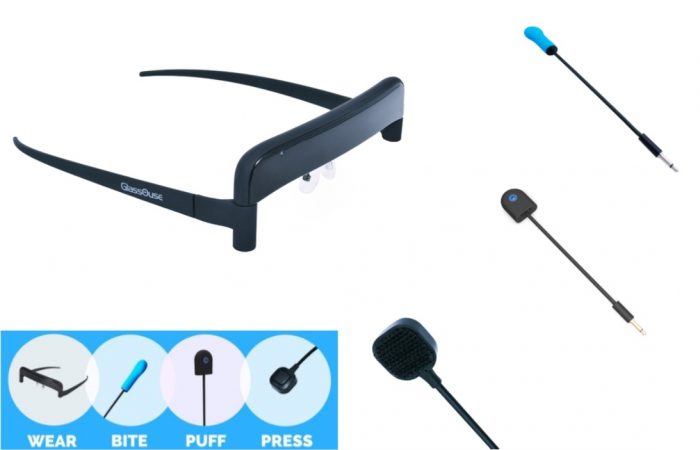
The GlassOuse is a wireless mouse alternative featuring built-in motion sensor to track head movements and convert them to move the mouse pointer. GlassOuse gives people with disabilities more control of their computers and devices for greater independence.
The GlassOuse connects via Bluetooth and has a 160 degree vertical and 180 degree horizontal angle precision, it also includes a hygienic, private use mouthpiece with waterproof cover; includes two waterproof silicone bite click covers and Sensitivity adjustment options to accommodate a range of users.
The quick response time – takes less than a second to type a character and the Bite click can withstand a great amount of pressure for hard biters. No special software required “Sleep” mode to extend battery life Compatible with Bluetooth-enabled Windows, Linux, Android, and Smart TV devices Includes micro-USB cable for recharging.
Contact Edit Microsytems to find out more about these products and to receive a quote.
Typing Stick, Mouth Stick and Adjustable Head Pointers
There are a wide variety of different Typing Sticks, Mouth Sticks and Head Pointers, which can be used for typing by persons with Mobility Impairments, depending on the type & degree of your disability, There are a wide variety of different Typing Sticks, Mouth Sticks and Head Pointers, which can be used for typing by persons with Mobility Impairments, depending on the type & degree of your disability. These include:
A Typing Stick is an assistive device used by persons with Mobility Impairments who have use of their arms, but impaired mobility in their hands. Typing Sticks enables the user to type better and quicker, a universal strap is attached to a narrow splint positioned on the wrist.
The splint is attached solely by means of the universal strap, which goes around the palm. A rubber-tipped wooden or carbon fibre rod sits in the universal strap. The rubber tip on the rod prevents the stick from slipping on the keys.
A typing stick can also be lodged between the fingers. If the stick sits firmly between the fingers, the user can do away with the strap.
There are various types of these products available in South Africa from companies like QASA. Please contact QASA, or DiSA if you require more information.

Mouth Sticks are used by persons with with Mobility Impairments who have no or little use of their arms and therefor have to use a longer Typing Stick which are held in one’s teeth.
The unit extends from jaw level, permitting better vision and body positioning than a forehead pointer. They are not bendable and the user stays comfortably positioned, and minimal head movement is required. It is an amazingly efficient tool for manipulating the keyboard and can also be used as a page turner. A Clamp-On Mouth Stick can securely hold a pen, pencil, paintbrush, chalk or similar tools, which are then controlled by the mouth. It can be adjusted with a thumbscrew lock-nut at the distal end to vary the angle and diameter.
There are various types of these products available in South Africa from companies like QASA. Please contact QASA, or DiSA if you require more information.

Adjustable Head Pointers are used by persons with Mobility Impairments who have no or little use of their arms and is an essential aid for activities such as turning pages, drawing or painting. It is a head brace which has pointing device mounted on it.
Head pointer sticks can be used for many other tasks other than just depressing keyboard keys, like dialling phone numbers or turning pages of a book. The aluminium frame, with foam-padded liner, can bend to fit head size. It is secured by an elastic chin strap and Velcro. Rods can be bent or cut to adjust angle and length.
There are various types of these products which are available in South Africa from companies like Edit Microsystems who sell the products listed below.
If you require any of these products but are unsure which will best suite you, please contact an Occupational Therapist near you.
A person is just required to move his/her head to make the head pointer type buttons, scroll through web pages.
A Head pointer is worn on head, and its extending piece reaches and engages with keyboard keys by moving head. Its small rubber tip increases precision and accuracy while typing. A Head pointer does not obstruct the field of vision of users; it is adjustable and comes in different sizes to accommodate varying customer needs.
Head pointer sticks can be used for many other tasks other than just depressing keyboard keys, like dialling phone numbers or turning pages of a book. The aluminium frame, with foam-padded liner, can bend to fit head size. It is secured by an elastic chin strap and Velcro. Rods can be bent or cut to adjust angle and length.
There are various types of these products which are available in South Africa from companies like Edit Microsystems who sell the products listed below.
If you require any of these products but are unsure which will best suite you, please contact an Occupational Therapist near you.
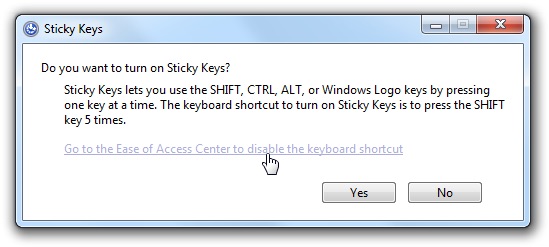
Sticky Keys is a Windows Ease of Access feature that makes it possible to use keyboard shortcuts or type capital letters without needing to press more than one key at once. Normally, you’d hold down the Shift key while pressing a letter to type a capital or hold down the Ctrl key while pressing ‘S’ to save a document. It’s even trickier if you want to use a shortcut such as Ctrl-Alt-Del or Ctrl-Shift-Esc.
Sticky Keys makes operating a keyboard with one hand easier, you can press Ctrl, Shift or Alt, let go and then press another key, you should hear a beep if you have the speakers connected. It’s great if you have a Mobility Impairment that affects your arms and can’t press two keys at once.
“I am a C5 Quadriplegic and always use it and find it helps allot. It also makes it easier to use keyboard shortcuts or hold down the Ctrl key while pressing ‘S’ to save a document for example.
You can Setup Sticky Keys when you hit one of your keyboard’s Shift keys five times in a row, this will cause a Window to pop-up, which will ask if you want to enable Sticky Keys. You can also switch it on by going to “Control Panel” then “‘Adjust Computer Settings” then “ease of access” and turn sticky keys on.”
These head-worn pointers (pictured above) represent a significant design advancement in providing efficient pointing from a psychologically and cosmetically sound perspective: the chin. Unlike forehead protrusion pointers, using an “out from the chin” device more realistically places the pointer in proximity to the item(s) being accessed. It also eliminates the unsightly barrier imposed by forehead pointers because it doesn’t interrupt either the wearer’s field of vision or the full view of the wearer’s face.
These AD Head Pointers have also just been upgraded to include a brand-new tip so they can be used with iPad, iPhone, and iPod Touch, as well as other touch screen tablets including Android and all other AAC dynamic display devices.
The AD-1 Standard Pointer * is fully adjustable; capable of being individually fitted to head sizes from 20-25 inches in circumference. AD Head Pointer Characteristics include:
– Lightweight aluminum and plastic construction.
– Fully and independently adjustable headband and yoke/pointer assemblies.
– Comfortable forehead and back cushions.
– All new tip for iPad, Android tablet, and other AAC touch screens.
– Adjustable chin strap available in two colors (brown/beige).
– Translucent, conforming soft plastic chin cup.
These head-pointers (pictured above) is made of conductive fabric; More sensitive and accurate; Have fabric which will not scratch screens; Will work on any conductive touch screens; More durable than previous tips; Features the latest technology for touch screen rods.
Product information for the AD-1 includes:
Size Temple to yoke: 10 in. (22 cm)
Pointer length: 10 in. (25cm)
Weight 8 oz. (230g)
The AD-1 Head pointer and other similar products are available to purchase from Edit Microsytems, contact them for more information.
E. Accessibility Tools and Resources
i) Disability Answer Desk
ii) Keyboard Shortcuts
Keyboard shortcuts are combinations of two or more keys that you can use to perform a task that would typically require a mouse or other pointing device.
Keyboard shortcuts can make it easier to work with your PC, saving you time and effort as you work with Windows and other apps. This can be particularly useful if your hands are impaired, especially in combination with “Sticky Keys”.
Examples of these include:

F1: Help
CTRL+ESC: Open Start menu
ALT+TAB: Switch between open programs
ALT+F4: Quit program
SHIFT+DELETE: Delete item permanently
Windows Logo+L: Lock the computer (without using CTRL+ALT+DELETE).
Mouse Keys allows you to move the mouse cursor from the keys in the number pad on the right side of a full-size keyboard. It is not as fast as a regular mouse, or even as fast as the Track Ball, but when turned on, Mouse Keys also allows you to click and drag.
This gives you much more control, especially in Graphic Design and if your hand movement is impaired.
To turn on the Mouse Keys option, click Start; Settings; Control Panel; Accessibility Options.
Click the Mouse Tab at the top of the dialog box and then click the little box next to Use Mouse Keys to put a check in it.
You can then select the options you want and click OK.
You can also turn on Mouse Keys by pressing Left Alt+Left Shift+Num Lock.
To change options like how quickly the mouse pointer moves and whether your PC makes a sound when you turn on Mouse Keys, in the Ease of Access Center, tap or click Make the mouse easier to use, and then, under Control the mouse with the keyboard, tap or click Set up Mouse Keys, and tap or click OK.
After you turn on Mouse Keys, you can use the numeric keypad to move the mouse.
To move the mouse pointer:
Up – 8
Down – 2
Right – 6
Left – 4
Up and to the left – 7
Down and to the left – 1
Up and to the right – 9
Down and to the right – 3
Sticky Keys is a Windows Ease of Access feature that makes it possible to use keyboard shortcuts or type capital letters without needing to press more than one key at once. Normally, you’d hold down the Shift key while pressing a letter to type a capital or hold down the Ctrl key while pressing ‘S’ to save a document. It’s even trickier if you want to use a shortcut such as Ctrl-Alt-Del or Ctrl-Shift-Esc.
Sticky Keys makes operating a keyboard with one hand easier, you can press Ctrl, Shift or Alt, let go and then press another key, you should hear a beep if you have the speakers connected. It’s great if you have a Mobility Impairment that affects your arms and can’t press two keys at once.
“I am a C5 Quadriplegic and always use it and find it helps allot. It also makes it easier to use keyboard shortcuts or hold down the Ctrl key while pressing ‘S’ to save a document for example.
You can Setup Sticky Keys when you hit one of your keyboard’s Shift keys five times in a row, this will cause a Window to pop-up, which will ask if you want to enable Sticky Keys. You can also switch it on by going to “Control Panel” then “‘Adjust Computer Settings” then “ease of access” and turn sticky keys on.”
Disclaimers and References
Simplified Summary
This Computer aids page deals with computers, tools, software, or devices that help people with physical impairments use computers more easily. It allows users to read, write, communicate, and access information independently.