


Computer and Electronic Aids
Welcome to the Computer Aids Page, where you can find the right type of computers, software and accessories to suite your needs.
In these modern times Computers are an essential piece of equipment for most people, but they are even more important Assistive Devices for persons with disabilities, including persons with Visual Impairments.
With the advent of the Internet and the multitude of businesses supported online, one’s imagination is the only limit. You can do just about anything from your home computer, including operating a business, doing research, socializing, listening to music, playing games, reading books, purchasing products, doing banking and taking part in discussions.
Many persons with Visual Impairments turn to computers to assist them in the tasks mentioned above and there are a number of Assistive Devices & adaptions available to purchase which make almost any computer accessible for anyone to use.
To find out more about these Computers, Electronic Aids and Assistive Devices and the companies or organizations that provide them, please read the article below OR click on the shortcut links provided alongside.
What Are You Looking For?
Finding the Right Computer Aid for You: Who can Help?
1. Choosing A Computer: Desktop vs Laptop vs Tablets
2. Choosing The Right Computer Accessories
A. Monitors
B. Keyboards, Accessories and Braille Displays
Low Vision Keyboards | Braille Stickers and Keyboard Covers | Braille Displays
C. Braille Translation Software
Screen-Readers
D. Screen Magnifiers and Software
E. OCR Hardware, Access Tools & Resources
i) OCR Hardware
iii) Voice Recognition Software
9. Accessibility Tools and Resources
– Disability Answer Desk


Finding the Right Computer Aid for You: Who can Help?
These companies specialise in providing products for people with Visual Impairments and should be able to advise you on the best type of Computer Aid or Software for you. They can also help set it up and operate correctly as well as service and repair the products that they sell should the need arise.

Edit Microsystems (Pty) Ltd is an award-winning company that is devoted to finding alternative and state-of-the-art technical solutions to improve curriculum delivery in educational institutions and effective communication in business with a focus on high-speed functional connectivity and on-going support.
They have a proud tradition of innovation and are on the cutting edge of technological advances in education. Many of their products are designed to enhance interactivity in a classroom or lecture theatre. Edit Microsystems are also a leader in finding and providing specially adapted hardware and software for Learners with Special Educational Needs throughout South Africa.
Contact: 086 111 3973
Head Office: 13 Boy De Goede Circle, Table View, Cape Town, 7441.
They also have branches in KwaZulu-Natal, Mpumalanga, Gauteng.
Website at: www.editmicro.co.za
Email them at: info@editmicro.co.za
Blind SA is a national disabled People’s Organisation (DPO) of the blind and for the blind. Established in 1946 as the South African Blind Workers Organisation (SABWO) and became Blind SA in 2004. Head office is situated at 5 Fuchs Street, Alrode, Alberton, however our services are rendered to blind and visually impaired in all provinces in South Africa.
The vision of Blind SA is to do whatever is necessary or conducive to empower visually impaired people to become economically self-supporting and to live a full and meaningful life as citizens of South Africa.
The biggest challenges faced in our communities are the shortage of financial resources to enable our blind and visually impaired beneficiaries to reach their full potential as independent members of society.
The impact that Blind SA has had on the community is a more informed, empowered and enabled blind and visually impaired community. Because we have so many such people who are in serious need of our assistance, we would welcome the opportunity and resources to be able to reach more people with the view of creating a self-supporting, independent and informed blind and visually impaired community throughout South Africa.
“Our Purpose is to end the cycle of poverty for Blind South Africans, empowering them with knowledge and information through education, braille and developmental services and to break down barriers, provide opportunities and create answers that improve the quality of life for the blind community so that they can live the life they choose.”
Blind SA also stock and sell a variety of Assistive Devices to assist persons who are Blind, these include the Mali-Bhala, Tatrapoint Mechanical Brailler and Braille-Me. For any other requirements, contact Blind SA on: Tel: +27 11 839 1793/4 or Email: ceo@blindsa.org.za, Jennine Pare – sales@blindsa.org.za, or visit us at: Address: 5 Fuchs Street, Alrode, Gauteng, South Africa. Website: www.blindsa.org.za.
Sensory Solutions is a South African company with considerable experience in the field of accommodating persons who are visually impaired, blind or partially sighted. We specialise in the field of providing Access Technology solutions for individuals, schools, universities, government departments and more, in order to make the environment more accessible for the visually impaired.
Sensory Solutions is at the forefront of the world’s leading Access Technology products and are in some cases the exclusive distributors. Sensory Solutions is a responsible employer which employs people from previously disadvantaged backgrounds as well as those who are disabled. Part of our mission is to advise individuals and institutions on the best solutions available for particular environments, to design such solutions and finally to implement them on site. As such, we are approved African distributors for a wide range of Access Technology products selected specifically for their suitability to the African environment and our specific situation.
We are proud to be appointed exclusive and preferred dealerships for some of the world’s most leading Access Technology manufacturers. Our mission and ethos revolve around our fellow man, empowering them and making the playing fields level as far as we can make a difference.
Whether you are an individual, institution or company in need of information regarding Access Technology, we are ready to assist you. Please feel free to contact us at our Head Office on +27 12 664 7704 or at 226 Kruger Avenue, Lyttelton Manor, Centurion, 0157. Email: info@sensorysolutions.co.za, khan@sensorysolutions.co.za or visit our website at: www.sensorysolutions.co.za.
1. Choosing the right type of Computer
Before purchasing a computer, you will need to decide whether you would require a Desktop, Laptop or Tablet. Each have their advantages and disadvantages, depending on your lifestyle, what they will be used for, type of impairment that you have; assistive devices that you will require to work the computer.
You would firstly need to look at the reason for purchasing a computer and then the advantages and benefits of both Desktops, Laptops and Tablet, which would then determine which one would suit your needs.
If you are struggling to decide which would be best suited for you, take a look at the advantages and disadvantages of each of these options below, to help you decide which to purchase, or find out more via the: Edit Microsystems Computer Buying Guide

1. Benefits of Desktops
Desktop computers offer a variety of benefits, in that they are easier, and less expensive, to upgrade and are generally less expensive overall, so offer better overall value. They also offer more storage and memory at a lower price than laptops. They are highly upgradeable, allowing easy expansion of RAM, storage, graphics, and peripherals to extend lifespan and adapt to changing needs.
Click Here to Find out more about the benefits of Desktops.

2. Benefits of Laptops
Laptops offer portability and flexibility, allowing people with physical impairments to work, learn, or communicate from different environments without being tied to a fixed setup.
Built-in accessibility features, lightweight designs, and compatibility with adaptive devices, laptops support greater independence and convenience.
Click Here to Find out more about the benefits of Desktops.
3. Benefits of Tablets
Tablets offer greater portability and ease of use, with touch-based interfaces that reduce the need for fine motor control compared to keyboards and mice.
Their lightweight design, adjustable mounting options, and accessibility features make them ideal for hands-free use and on-the-go independence for people with physical disabilities.
Click Here Find out more about the benefits of Tablets.
Desktop Computers

Desktop computers offer a variety of benefits, they not as portable as a laptops, but can be a more affordable and powerful option, with more features than Laptop computers, therefor ideal for a classroom, office or organisation. There are also a variety of other advantages that Desktops have over Laptop, which include:
– Desktop computers are easier, and less expensive, to upgrade.
– Desktop computers are generally less expensive overall and offer a better overall value.
– Desktop computers generally have larger monitors, which can also be connected to Laptops.
– Desktop computers have a lower risk of theft.
– Desktop computers have a more comfortable keyboard and a much easier to use mouse.
It should be noted that an aftermarket large, comfortable Keyboard and Mouse or Trackball, are also possible.
There are a variety of different types of Desktops available from various companies but there are advantages to purchasing your machine from companies like Edit Microsytems
Edit Microsytems can supply desktop computers from all brands to your unique specification requirements. If you know what you are looking for, you can send them your specifications and they will quote you. If you are unsure about your computing needs, you can contact them, so that one of their highly trained sales staff can assist you to find the ideal solution based on what you would like to use the computer for.
Contact Edit Microsytems, to find out more about these types of products or to receive a quote.
Laptops Computers
A Laptop, sometimes called a Notebook, is a portable personal computer, which has a Keyboard and screen that can be folded shut for transportation. Laptops are extremely useful for home, working while traveling or for people who have to spend time in bed or hospital and still need to work on their Laptops.
There are numerous advantages to a laptop, but essentially, the choice comes down to portability versus functionality and cost.
While desktop computers are less expensive, more powerful and more user-friendly, there is a lot to be said for being able to work, check emails, chat online, write papers and play video games anytime and anywhere you like. This is particularly true if you are a person with Mobility Impairments.
And besides, laptops these days are highly adaptable, one can easily purchase a more comfortable Keyboard, Mouse or Trackball, a larger monitor and/or an External Hard Drive to store and backup work if space is an issue.

Tablets
2. Choosing The Right Computer Accessories
Choosing the right computer accessories for people with physical impairments involves matching tools to the user’s strength, mobility, and comfort needs. From ergonomic keyboards to adaptive mice and switch controls, the best choice is one that supports independence, reduces strain, and enhances everyday usability. Please click on the relevant categories listed below to find products that can assist which are available in South Africa.
A. Monitors
All computers comprise of a Monitor, whether they are Desktops or Laptops. A Monitor is an output device that displays information in pictorial form, it usually comprises the display device, circuitry, casing, and power supply. The display device in modern monitors is typically a thin film transistor liquid crystal display (TFT-LCD) with LED back lighting.
Touch screen Monitors are also available for certain types of software, particularly those that do not require pixel-accurate pointing. These monitors use touching of the screen as an input method, items can be selected or moved with a finger, and finger gestures may be used to convey commands. The screen will need frequent cleaning due to image degradation from fingerprints.
There are a variety of different types of Monitors available on the market today, from a diversity of sources. Edit Microsytems also supplies LCD and LED monitors in a wide range of sizes and connectivity options. Their monitor range includes touch screen monitors for special education needs. Contact Edit Microsytems, to find out more about these types of products or to receive a quote.
B. Keyboards, Accessories and Braille Displays
Standard keyboards and mice are functional ways of interacting with your computer and increasingly other devices like tablets. However, these standard devices can pose difficulties for many people, especially those users with physical, sensory, or cognitive challenges. There are lots of other options available. Being physically comfortable when using your technology is extremely important and extends beyond having a keyboard or mouse that is comfortable to use.
Poor-posture, over-stretching or discomfort can result in aggravating existing conditions or in developing longer-term issues such as Repetitive Strain injuries (RSI’s). Good posture and comfortable working is important for everyone and finding something that works for you is obviously more important in preventing problems than in reaction to them.
The standard computer keyboard is designed to be used with two hands and has a number pad on the right-hand side, which obviously favours right-handed people. Fret not, there are numerous alternatives to the standard keyboard available on the market today including:
Low Vision Keyboards
Low vision keyboards are specialized computer keyboards designed to support people with reduced vision by making keys easier to see, distinguish, and use accurately. They do not correct vision loss, but they reduce visual strain and improve typing accuracy and independence.
Key Features of Low Vision Keyboards
– Large-print keys – Letters, numbers, and symbols are printed in oversized, bold fonts.
– High-contrast colors – Common combinations include black keys with white or yellow text, or yellow keys with black text, making characters stand out clearly.
– Clear, simple layouts – Reduced visual clutter helps users locate keys faster.
– Tactile cues (in some models) – Slightly raised or textured keys help with finger placement.
– Standard QWERTY layout – Familiar arrangement avoids the need to relearn typing
View the examples in the Accordion Menus below that are available from companies such as Edit Microsystems and Sensory Solutions:

The EasyTouch Large Print Multimedia Keyboard (pictured right) is designed for those whose eyesight isn’t quite what it used to be, or for anyone with a slight visual impairment. With its large 4X black print on bright yellow keys, you can type out anything from a simple email to finishing your next novel with greater ease and less strain on your eyes. The membrane key switches provide a quiet and quick response and stand up to heavy use– up to 5 million keystrokes! Not only is the Adesso® AKB-132UY keyboard great for anyone with slight visual impairments, but its large, bright florescent keys make it a great and even fun tool for kids to use too! The Features include:
Fluorescent 4X Print Keys: The large 4X size black print on fluorescent yellow keys provides excellent contrast and stronger appeal over traditional keyboards that have small, hard-to-read white letters on black keys.
Multimedia and Internet Hot Keys: Control your media player and browse the Internet with just one key touch using the built-in Multimedia and Internet Hot Keys for easy access to your favourite media or website!
Quiet Membrane Key Switches: With a life cycle of 5 million keystrokes, Membrane key switches provide a faster response along with a quieter typing experience.
These keyboards are available to purchase in South Africa from organizations and companies such as Sensory Solutions, contact them to find out more about the specifications, or to receive a quote.

The ZoomText Large-Print Keyboard (pictured right) is designed for anyone who struggles to see the lettering on their keyboard, the ZoomText large-print keyboard makes typing faster and easier than before. Each key and button label is easy to see, thanks to its 36-point text and high-contrast colour options. The ZoomText large-print keyboard also provides quick access to ZoomText features. The F1 through F12 keys perform double duty – when you press and hold a function key, its assigned ZoomText command is triggered.
The commands allow you to instantly start ZoomText, change magnification levels, toggle screen enhancements, launch AppReader and DocReader, and more, all without having to memorize hotkeys. You can even reassign each feature key to your choice of ZoomText commands, Internet and multimedia commands, or to open an application, document or web page. The keyboard requires ZoomText version 9.03 or greater & you can choose between “Black on Yellow” or “White on Black” colour options.
These keyboards are available to purchase in South Africa from organizations and companies such as Sensory Solutions, contact them to find out more about the specifications, or to receive a quote.
Braille Stickers and Keyboard Covers
Alphabet, Keyboard & Braille Stickers are an economical option for creating a contrast or bilingual Braille keyboard. Braille stickers are printed on clear Lexan, so the original key legend shows through; this allows you to add Braille stickers to your existing keyboard so that it becomes a bilingual keyboard (Braille) and the original language of your keyboard. The stickers use an easy peel-and-stick method to install & will not ooze adhesive, dry out, or damage the original keyboard key. Various types of Alphabets, Keyboard & Braille Stickers are available in different styles in South Africa & include products such as:

Alphabet or Keyboard Stickers: The Alphabet, Keyboard Stickers are a Set of vinyl stickers for the QWERTY keyboard. This includes lower case and upper case, in the renowned Sassoon font. These stickers are ideal for users who have visual difficulties including a special contrast & it includes 1 sheet consisting of 4 choices of style. The stickers include the Alphabet only & are available to be purchase from companies such as Edit Microsytems, contact them to find out more or to receive a quote.
These and other types of Alphabet, Keyboard & Braille Stickers are available to purchase from companies and organisations such as Sensory Solutions, Edit Microsystems and The South African Council for the Blind (SANCB), contact them to find out more, or Contact Us if you require any assistance.

The Braille keyboard cover is a moulded cover which fits over the keyboard meaning that a Braille user can easily identify what they are typing. The cover is designed to fit a specific USB keyboard which is provided as part of the product. When the box is opened, you will find that the cover has already been fitted for you to the keyboard.
The Braille characters are moulded into polyurethane film so cannot be squashed or damaged and will not come loose like stickers can over time, which is a real advantage if you intend using it regularly. The cover will also protect the computer keyboard from dirt & finger marks as well. If you can hear, you’ll be able to use this keyboard alongside screen reader software such as JAWS which will allow you to listen.
There a various other type of Braille Keyboard Covers which are available in South Africa, Contact Us to find out what types are available in South Africa and which companies supply them.
Braille Displays
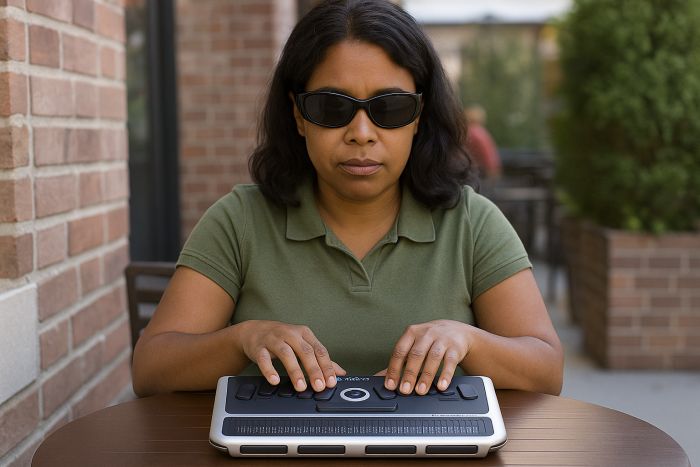
Braille Displays are devices that allow blind or visually impaired individuals to read digital text in braille. They consist of a series of small pins or cells that can be raised or lowered to form braille characters. When connected to a computer or mobile device, the display converts on-screen text into braille, allowing users to read the information with their fingers.
Braille displays are often used in conjunction with screen readers, which convert on-screen text into speech or other audio output. Together, these technologies enable blind or visually impaired individuals to access and interact with digital content in a way that is like sighted individuals.
Braille displays are available in various sizes and configurations, ranging from portable, single-line displays to larger, multi-line displays that can show several lines of braille text at once. They are widely used in education, employment, and daily life for individuals who are blind or visually impaired and are available to purchase companies and organisations such as Sensory Solutions, Edit Microsystems and The South African Council for the Blind (SANCB) and include products such as:

The QBraille XL (pictured right) represents an entirely new type of 40-cell braille display – a unique blend of a Perkins keyboard QBraille XL and QWERTY function keys. This device replaces the need for special keystrokes with the intuitively placed function keys found on all QWERTY keyboards. Closing an application means simply pressing the familiar Alt + F4 buttons.
The QBraille XL supports one USB and six simultaneous Bluetooth connections, for immediate braille access to all your devices from a single keystroke. As standalone, you can read braille, text, PDF and Word documents with the built-in Notepad, and create text and braille files. QBraille XL introduces an innovation to the braille display market, offering blind users their natural method of braille entry combined with intuitive command operation through standard QWERTY keys.
The QBraille XL is available to purchase in South Africa from organizations and companies such as Sensory Solutions, contact them to find out more about this product, or to receive a quote.
These and other types of Alphabet, Keyboard & Braille Stickers are available to purchase from companies and organisations such as Sensory Solutions, Edit Microsystems and The South African Council for the Blind (SANCB), contact them to find out more, or Contact Us if you require any assistance.

Orbit Reader 20: The Orbit Reader 20 is an affordable refreshable braille display. It is a unique 3-in-1 device and serves as a self-contained book reader, a note-taker and as a braille display by connecting to a computer or smartphone via USB or Bluetooth. Features include Unique signage-quality braille; 20 eight-dot refreshable braille cells; Book-reader mode allows you to read your favourite books and files from a SD card; Note-taker mode allows you to take notes and edits files.
The Braille display mode connects to computers and mobile devices over USB and Bluetooth, you can use it stand-alone or connected to a computer or mobile device, it works with all popular screen readers on Windows, Mac OS, iOS and Android. You can switch easily and instantly between modes, it also includes full featured, high-quality Perkins-style 8-key braille keyboard; Panning control rocker keys at each end of display; Cursor pad with 4-way arrows and select keys for easy navigation; Micro-USB port for charging and connectivity; Fast-charging long-life battery; Language-independent operation. The Orbit Reader 20 has a Solid, durable construction & is resistant to fluids and dust, it is compact, lightweight and portable (less than 1 lb., 6.6 x 4.3 x 1.25 inch)
These Orbit Readers are available to purchase in South Africa from organizations and companies such as Sensory Solutions, contact them to find out more, or to receive a quote.
C. Braille Translation Software
Edit Microsystems also provide a variety of other Headset- Speakers and Microphone devices to suit your needs, including various portable headsets which allow you to engage in a variety of activities anywhere anytime. They include the:
Braille Translation Software
Braille translation software exists to handle most of the common languages of the world, and many technical areas, such as mathematics (mathematical notation), for example WIMATS; music (musical notation) and tactile graphics. They allow, using standard or specific programs, screen magnification and conversion of text into sound or touch (Braille line), and are useful for all levels of visual handicap. OCR scanners can, in conjunction with text-to-speech software, read the contents of books and documents aloud via computer.
Although persons who are blind use speech output systems to read aloud electronic documents, tactile formats are often most effective in highly technical disciplines such as mathematics, physics, computer science, and engineering. Braille translation software translates electronic documents into Braille code. From these files, a refreshable Braille display can present tactile Braille, or a Braille embosser can produce a hard copy on special paper.
There are a various type of Software for the Blind available in South Africa, which is sold by companies such as Edit Microsystems and Sensory Solutions and makes computers easier to operate by Persons who are Blind or have Visual Impairments. This includes:
Synapptic is an all-in-one software package for people who are blind or partially sighted, it is easy-to-use, quick-to-learn and affordable. It runs on Android Smartphones and Tablets and has been specifically designed to be quick-to-learn and easy-to-use thanks to its simple and straightforward menu structure and intuitive design, Synapptic requires very little training, so most people teach themselves how to use it in just a few minutes. If extra advice and support is needed, Help Pages can be accessed for each screen.
If you’re thinking of using a Tablet or Smartphone for the first time or just want to communicate and catch-up quickly and easily while on the move, then Synapptic is for you! Synapptic is available as a separate software package to install on an existing Android device, or as a complete Smartphone or Tablet, fully setup and ready to go.
You can contact Edit Microsytems to find out more or to receive a quote.
Duxbury: Duxbury Braille Translator (pictured right) produces contracted and uncontracted braille, mathematics and technical braille. The software supports grade 1 and grade 2 translation (if available) in all South African languages, as well as Duxbury Software on Screen many other languages. Formatting of braille pages involves issues beyond those affecting print. DBT provides translation and formatting facilities to automate the process of conversion from regular print to braille (and braille to print) and also provides word processing facilities for editing directly in the braille as well as the print. A special braille “font” is used for displaying the braille on the screen.
Key Features include Fully supports UEB (Unified English Braille); Supports grade 1 and grade 2 translation in all South African languages; Produces contracted and uncontracted braille, mathematics and technical braille; Accurate contracted braille; Supports all commercial braille embossers; Imports files from HTML, MS Word, OpenOffice and other formats
Direct imports of math in MS Word documents with Math Type installed; Available in single-user licences or multi-user network licences.
This software is available from companies such as Sensory Solutions, contact them to purchase the product, or to find out more.
MathType (pictured right) is a powerful interactive equation editor for Windows and Mac that lets you create mathematical notation for word processing, desktop publishing, web pages, presentations and for TeX, LaTeX and MathML documents. MathType on Screen After editing your equations in MathType, you can use Duxbury or Tiger Software Suite to translate math equations to braille.
Key Features include:
– Point-and-click editing with automatic formatting: Create equations quickly by choosing templates and typing into their empty slots
– Keyboard shortcuts: Save time using keyboard shortcuts
– Type TeX or LaTeX: Enter equations directly into MathType or Microsoft Word documents using the TeX typesetting language
– Supports Microsoft Office 2007 and later, including Office 365
– Compatible with Windows 7, 8.1 and 10
This software is available from companies such as Sensory Solutions, contact them to purchase the product, or to find out more.

TactileView creates pictures for people who cannot see. These pictures are transformed into tactile graphics. Blind people can “read” them through touch and interpret the tactile material. Easy-to-use tools are available for the design TactileView and production of tactile pictures, diagrams and maps. The TactileView concept consists of design software for the creation of tactile graphics and an international web catalogue. The design software allows production (printing) on a braille embosser or on swell paper (microcapsule paper).
Key features include Easy-to-use tactile graphics editor in many languages; Fully accessible with the mouse, keyboard or screen reader; Wide range of supported braille embossers; Create designs for printing on swell paper; Many drawing tools and image processing filters available for easy editing; Thousands of ready-to-use designs can be downloaded from the TactileView catalogue; Importing images from a wide range of file formats and sources; By combining TactileView with Duxbury, you can create documents that contain both tactile graphics and braille text and is Compatible with Windows 7, 8.1 and 10.
This software is available from companies such as Sensory Solutions, contact them to purchase the product, or to find out more.
Screen Readers
Screen readers are assistive technology software programs that allow blind or visually impaired individuals to access and interact with digital content. They work by converting on-screen text into synthesized speech or other audio output, which can be heard through a computer’s speakers or a headset. Screen readers use various techniques to interpret and convey digital content, including web pages, documents, and applications. For example, they may use keyboard shortcuts to navigate through text, read text aloud using synthetic voices, or provide information about visual elements such as images and graphics.
Screen readers are essential tools for many blind or visually impaired individuals, as they allow them to access and interact with digital content in a way that is like sighted individuals. They are commonly used in educational settings, for employment purposes, and for daily life activities such as accessing email, browsing the web, and using social media.
Screen readers are constantly evolving and improving, making it easier for individuals with visual impairments to access digital content and participate in the modern world and are available to purchase companies and organisations such as Sensory Solutions, Edit Microsystems and The South African Council for the Blind (SANCB) and include products such as:
JAWS Software (pictured right) is the most popular screen reading software developed for computer users whose vision loss prevents them from seeing screen content or navigating with a mouse. JAWS provides speech and braille output for the Jaws Screen Reader most common computer applications on your PC. You will be able to navigate the Internet, write documents, read emails and create presentations from your office, remote desktop or from home. JAWS works with Microsoft Office, Google Docs, Chrome, Internet Explorer, Firefox, Edge and much more. It is available in both Home (non-commercial) and Professional version.
Key Features include Two multilingual synthesizers: Eloquence & Vocalizer Expressive; Talking installation; Convenient OCR feature for image files or inaccessible PDF documents; Save time with Skim Reading and Text Analyzer Tools; Provide contracted braille input from your braille keyboard; Support for MathML content; Fast information lookup at your fingertips with Research It; Built-in free DAISY player and full set of DAISY-formatted training; Fully compatible with ZoomText, Fusion and OpenBook and Supports Windows 11, Windows 10, Windows Server 2019 and Windows Server 2016, including touch screens and gestures.
Jaws Screen Readers are available to purchase in South Africa from organizations and companies such as Sensory Solutions and The South African Council for the Blind (SANCB), contact them to find out more about this product, or to receive a quote.
Duxbury: Duxbury Braille Translator (pictured right) produces contracted and uncontracted braille, mathematics and technical braille. The software supports grade 1 and grade 2 translation (if available) in all South African languages, as well as Duxbury Software on Screen many other languages. Formatting of braille pages involves issues beyond those affecting print. DBT provides translation and formatting facilities to automate the process of conversion from regular print to braille (and braille to print) and also provides word processing facilities for editing directly in the braille as well as the print. A special braille “font” is used for displaying the braille on the screen.
Key Features include Fully supports UEB (Unified English Braille); Supports grade 1 and grade 2 translation in all South African languages; Produces contracted and uncontracted braille, mathematics and technical braille; Accurate contracted braille; Supports all commercial braille embossers; Imports files from HTML, MS Word, OpenOffice and other formats
Direct imports of math in MS Word documents with Math Type installed; Available in single-user licences or multi-user network licences.
This software is available from companies such as Sensory Solutions, contact them to purchase the product, or to find out more.
MathType (pictured right) is a powerful interactive equation editor for Windows and Mac that lets you create mathematical notation for word processing, desktop publishing, web pages, presentations and for TeX, LaTeX and MathML documents. MathType on Screen After editing your equations in MathType, you can use Duxbury or Tiger Software Suite to translate math equations to braille.
Key Features include:
– Point-and-click editing with automatic formatting: Create equations quickly by choosing templates and typing into their empty slots
– Keyboard shortcuts: Save time using keyboard shortcuts
– Type TeX or LaTeX: Enter equations directly into MathType or Microsoft Word documents using the TeX typesetting language
– Supports Microsoft Office 2007 and later, including Office 365
– Compatible with Windows 7, 8.1 and 10
This software is available from companies such as Sensory Solutions, contact them to purchase the product, or to find out more.
TactileView creates pictures for people who cannot see. These pictures are transformed into tactile graphics. Blind people can “read” them through touch and interpret the tactile material. Easy-to-use tools are available for the design TactileView and production of tactile pictures, diagrams and maps. The TactileView concept consists of design software for the creation of tactile graphics and an international web catalogue. The design software allows production (printing) on a braille embosser or on swell paper (microcapsule paper).
Key features include Easy-to-use tactile graphics editor in many languages; Fully accessible with the mouse, keyboard or screen reader; Wide range of supported braille embossers; Create designs for printing on swell paper; Many drawing tools and image processing filters available for easy editing; Thousands of ready-to-use designs can be downloaded from the TactileView catalogue; Importing images from a wide range of file formats and sources; By combining TactileView with Duxbury, you can create documents that contain both tactile graphics and braille text and is Compatible with Windows 7, 8.1 and 10.
This software is available from companies such as Sensory Solutions, contact them to purchase the product, or to find out more.
D. Screen Magnifiers and Software
Screen magnifiers are software programs or built-in features in operating systems that allow users to enlarge the display on their computer screens. They are especially useful for people with visual impairments or those who need to view details on the screen more closely. Screen magnifiers work by zooming in on a portion of the screen and enlarging it to fill the entire display area. This can be done using different methods, such as:
Full-screen magnification: This method enlarges the entire screen uniformly.
Lens magnification: This method creates a virtual magnifying glass that follows the mouse pointer or keyboard focus, enlarging only a portion of the screen around it.
Docked magnification: This method enlarges a fixed portion of the screen, typically a window or panel, and keeps it in a fixed position.
Screen magnifiers usually come with a range of customization options, such as changing the magnification level, color contrast, and text size. Some magnifiers also offer speech output or other accessibility features. Screen magnifiers are available on a variety of platforms, including Windows, macOS, and Linux and are also available as mobile apps for smartphones and tablets.
Screen magnifiers are are available to purchase companies and organisations such as Sensory Solutions, Edit Microsystems and The South African Council for the Blind (SANCB) and include products such as:
Magnification Software
Edit Microsystems also provide a variety of other Headset- Speakers and Microphone devices to suit your needs, including various portable headsets which allow you to engage in a variety of activities anywhere anytime. They include the:
ZoomText is a software application (pictured right) offering magnification, colour contrast and pointer and cursor enhancements. ZoomText comes in two versions – ZoomText Magnifier, which will enlarge and enhance everything on ZoomText your computer screen with perfect clarity, making all of your applications easy to see and use; and ZoomText Magnifier/ Reader, which includes all the great features of ZoomText Magnifier, and will additionally read aloud any text on your computer screen. ZoomText allows for great productivity and supports Windows 11, Windows 10, Windows Server 2019 and Windows Server 2017 operating systems as well as the latest versions of popular applications.
Key Features include xFont magnification; Flexible magnification up to 60x; Support for touch screen devices; Enhanced screen colours; Visible pointers and cursors; Smooth navigation; Multiple monitor support; Windows login support; New Smart Invert; Quick access bar docked to screen automatically when ZoomText is launched; Voice Assistant; Sound splitter and Supports Windows 11 and 10.
Zoom Text is available to purchase in South Africa from organizations and companies such as Sensory Solutions, contact them to find out more about the features, or to receive a quote.
Magnifiers
Edit Microsystems also provide a variety of other Headset- Speakers and Microphone devices to suit your needs, including various portable headsets which allow you to engage in a variety of activities anywhere anytime. They include the:

DaVinci Pro HD OCR Magnifier: DaVinci Pro HD/OCR (Pictured right) is a high-performance desktop video magnifier (CCTV), featuring a full HD 3-in-1 camera and full-page text-to-speech (OCR). View crystal clear images in vibrant colour and DaVinci Pro HD/OCR contrast, while enjoying a large field of view to see more on the screen. The full-page OCR feature allows you to read your favourite article or book aloud with a premium male or female voice. You have the option to read a full page or select an area of the page to be read.
DaVinci Pro HD/OCR 3-in-1 camera allows you to see near, far or a mirror image, making it the perfect electronic magnifier for any task. It is great for applying make-up, shaving, reading, writing, viewing presentations and whiteboards and so much more.
Key Features include 24” high-resolution LCD, pivots for best image quality; Full HD 1080p camera for live CCTV mode
Autofocus 3-in-1 camera for self-viewing, reading or distance viewing; Magnification up to 77x; 28 viewing modes to optimise contrast and brightness; 13 MP camera for accurate full-page text-to-speech; Reading preview to read entire page or toggle paragraphs and read selected text; Male and female premium voices; Multiple language recognition; Easy-to-use console with simple and advanced modes; Computer compatible – toggle between CCTV and computer; Save documents, pictures or books and export files to your PC and a 2 year warranty.
The DaVinci HD OCR Magnifier is available to purchase in South Africa from organizations and companies such as Sensory Solutions, contact them to find out more about the features, or to receive a quote.

The ONYX Deskset HD’s sleek new design (pictured right) has an integrated high-definition camera and a portable monitor to let you read what you want, wherever you go, you can read objects from across large rooms or magnify items such as reading materials, classroom assignments and more.
This a portable video magnifier adapts to multiple environments and tasks for productivity at school, work, and at home. The 3-in-1 flexible camera provides document reading, distance viewing, and self-viewing modes with versatile controls.
The ONYX Deskset HD Magnifier is available to purchase in South Africa from organizations and companies such as Sensory Solutions, contact them to find out more about the Features & Productive Features, or to receive a quote.
E. OCR Hardware, Access Tools & Resources
i) OCR Hardware
1. Flatbed Scanners
Flatbed scanners are commonly used OCR hardware that is designed to scan documents and convert them into digital format. These scanners use a flat glass surface where the document is placed face down and scanned using a scanning head that moves across the document.

2. Handheld Scanners
Handheld scanners are portable OCR hardware that can be used to scan text and images from physical documents, books, and other printed materials. These scanners are lightweight and easy to use, making them ideal for on-the-go scanning needs.

3. Document Scanner

CanoScan LiDE: With a sleek, compact and stylish design, the CanoScan LiDE is a lightweight A4 flatbed scanner fitted with 4 EZ operation buttons for easy use and hassle-free scanning. It is perfect for high-resolution scanning at home or in the office. CanoScan LiDE is an affordable space-saving solution and scanning takes no time at all.
Key Features include Optical resolution: 2400 x 2400 dpi; 4 EZ one-touch buttons; 300 dpi A4 colour scans delivered in just 10 seconds; Power and connect using a single USB cable to minimise desk clutter; Size: 25 x 36.7 x 4.2 cm and a Weight of 1.7 kg.
The CanoScan LiDE is available to purchase in South Africa from organizations and companies such as Sensory Solutions, contact them to find out more, or to receive a quote.
The Sense Player and Sense Player OCR with its sleek design and comfortable useability offer more than what you would traditionally get on a multimedia device. Whilst it allows you to do high quality recordings, listen to a wide range of document, audio and video formatted files, its unique Smart Connect feature allows you to remotely control Sense Player and Sense Player OCR your Apple or Android mobile device via the keypad of the Sense player.
Select text mode and have the ability to type out WhatsApp and Facebook messages as well as create and reply to emails. With a quick press of a button, you can switch to web browsing mode and seamlessly navigate between headings, links, tables and other elements on a web page. You also have the option to send your Smart phone audio via Bluetooth to the Sense Player. The OCR version provides additional functionality allowing the scanning of hard copy printed documents which is then read back to the user providing access to menus, pamphlets and brochures while on the move. Though the Sense Player is a powerful device with advanced features, it remains easy to use, even for the non-technical person.
The Sense Player is available to purchase in South Africa from organizations and companies such as Sensory Solutions, contact them to find out more about this product and its features, or to receive a quote.
i) Disability Answer Desk