


Writing and Printing Aids
Literacy is a key to personal independence and the access to information for Persons who are Blind, Reading and Writing can only be attained through Braille, making it key to literacy.
Thanks to the availability of a variety of Printing Aids, Braille literature and printed materials are more readily available through Schools, Universities, Libraries, Organizations and Companies. Writing Aids, and various techniques have also been developed to assist persons who have Visual Impairments, so that they are able to Write or Sign.
These Writing Aids can include simple assistive devices such as writing or signature guides, Slate and Stylus, paper with raised or bold lines or Special Pens. The use of slant boards, and different types of magnification may also be helpful for those who are writing print, while equipment such as Tape Recorders can be used to capture meetings, lectures or assist in composition of papers, while voice synthesizers can read each page back to the user.
What Are You Looking For?
Companies and Organisations That Can Assist
Writing & Printing Aids | What do you require?
1. Signature Guides
2. Slate And Stylus
3. Magnifiers
4. Braille Notetakers
5. Braille Embossers
6. Braille Writers
7. Voice Recorders
View the information below to find further information on the products available and the companies that provide them.


Companies and Organisations That Can Assist
These and other Writing and Printing Aids are readily available in South Africa from organizations and companies such as Blind SA, The South African Council for the Blind (SANCB), Sensory Solutions and Edit Microsystems. Please read the information below to find out more about these different types of Writing & Printing Aids, as well as some of the companies that supply them.

Edit Microsystems (Pty) Ltd is an award-winning company that is devoted to finding alternative and state-of-the-art technical solutions to improve curriculum delivery in educational institutions and effective communication in business with a focus on high-speed functional connectivity and on-going support.
They have a proud tradition of innovation and are on the cutting edge of technological advances in education. Many of their products are designed to enhance interactivity in a classroom or lecture theatre. Edit Microsystems are also a leader in finding and providing specially adapted hardware and software for Learners with Special Educational Needs throughout South Africa.
Contact: 086 111 3973
Head Office: 13 Boy De Goede Circle, Table View, Cape Town, 7441.
They also have branches in KwaZulu-Natal, Mpumalanga, Gauteng.
Website at: www.editmicro.co.za
Email them at: info@editmicro.co.za
Blind SA is a national disabled People’s Organisation (DPO) of the blind and for the blind. Established in 1946 as the South African Blind Workers Organisation (SABWO) and became Blind SA in 2004. Head office is situated at 5 Fuchs Street, Alrode, Alberton, however our services are rendered to blind and visually impaired in all provinces in South Africa.
The vision of Blind SA is to do whatever is necessary or conducive to empower visually impaired people to become economically self-supporting and to live a full and meaningful life as citizens of South Africa.
The biggest challenges faced in our communities are the shortage of financial resources to enable our blind and visually impaired beneficiaries to reach their full potential as independent members of society.
The impact that Blind SA has had on the community is a more informed, empowered and enabled blind and visually impaired community. Because we have so many such people who are in serious need of our assistance, we would welcome the opportunity and resources to be able to reach more people with the view of creating a self-supporting, independent and informed blind and visually impaired community throughout South Africa.
“Our Purpose is to end the cycle of poverty for Blind South Africans, empowering them with knowledge and information through education, braille and developmental services and to break down barriers, provide opportunities and create answers that improve the quality of life for the blind community so that they can live the life they choose.”
Blind SA also stock and sell a variety of Assistive Devices to assist persons who are Blind, these include the Mali-Bhala, Tatrapoint Mechanical Brailler and Braille-Me. For any other requirements, contact Blind SA on: Tel: +27 11 839 1793/4 or Email: ceo@blindsa.org.za, Jennine Pare – sales@blindsa.org.za, or visit us at: Address: 5 Fuchs Street, Alrode, Gauteng, South Africa. Website: www.blindsa.org.za.
Sensory Solutions: Sensory Solutions is a South African company with considerable experience in the field of accommodating persons who are visually impaired, blind or partially sighted. We specialise in the field of providing Access Technology solutions for individuals, schools, universities, government departments and more, in order to make the environment more accessible for the visually impaired.
Sensory Solutions is at the forefront of the world’s leading Access Technology products and are in some cases the exclusive distributors. Sensory Solutions is a responsible employer which employs people from previously disadvantaged backgrounds as well as those who are disabled. Part of our mission is to advise individuals and institutions on the best solutions available for particular environments, to design such solutions and finally to implement them on site. As such, we are approved African distributors for a wide range of Access Technology products selected specifically for their suitability to the African environment and our specific situation.
We are proud to be appointed exclusive and preferred dealerships for some of the world’s most leading Access Technology manufacturers. Our mission and ethos revolve around our fellow man, empowering them and making the playing fields level as far as we can make a difference.
Whether you are an individual, institution or company in need of information regarding Access Technology, we are ready to assist you. Please feel free to contact us at our Head Office on +27 12 664 7704 or at 226 Kruger Avenue, Lyttelton Manor, Centurion, 0157. Email: info@sensorysolutions.co.za, khan@sensorysolutions.co.za or visit our website at: www.sensorysolutions.co.za.
Writing and Printing Aids | What do you require?
Writing and Printing Aids for people who are blind or have severe visual impairments enable independent notetaking, communication, and organisation in everyday life. These aids allow users to record information accurately, complete forms, label items, and express ideas confidently, supporting greater independence at home, in education, and in the workplace.
They Include:
1. Signature Guides
Signature Guides are ideal for persons who have trouble seeing where to sign important documents, like your tax return. It is a simple tool that helps you to sign on the dotted line every time. Signature guides are typically made of cardboard or plastic and work by using a cutout space or raised lines to help you sign in place.
These Guides are inexpensive and come in several sizes, so you can keep them in the places where you are most likely to use them, such as your home, office or wallet. When you’re ready to sign, you can ask someone to put the window of the guide over the signature line; hold the guide in place; and sign in the area outlined by the window.
Signature Guides are available to purchase in South Africa from organizations such as the South African National Council for the Blind and Blind SA and include products such as:
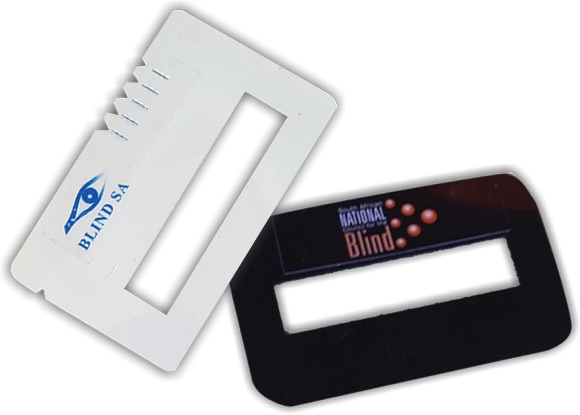
Mali-Bhala: This locally created device (pictured right) comes in two standard sizes that are designed to fit either in a person’s wallet or pocket. It is used as an indicator to differentiate between the five South African ‘Mandela’ bank notes and as a signature guide. It gives thousands of blind and partially sighted individuals the independence of signing documents and counting money.
The cost for a single Mali-Bhala is R20 or R35 for a double pack that includes both the pocket and wallet size devices. Blind SA strives to make assistive devices like this one more accessible and affordable to the blind community.
Signature Guides are available to purchase in South Africa from organizations such as the South African National Council for the Blind and Blind SA who recently launched Mali-Bhala – a money counter and signature guide – in association with the Disability Rights Awareness Month.
For more information or enquiries on this device, please contact Blind SA through their website or Tel: 011 839 1793.
2. Slate and Stylus
The Slate and Stylus (pictured right) is a simple, portable writing aid used by people who are blind to write in Braille. The slate acts as a guide with evenly spaced cells, while the stylus is used to emboss raised dots onto thick paper by pressing from right to left. Once the paper is turned over, the Braille can be read from left to right by touch. Lightweight, affordable, and durable, a slate and stylus allow users to take notes, label items, and write independently anywhere without the need for electricity or technology.
Writing is accomplished by placing a piece of heavy paper in the slate, aligning it correctly and closing the slate. The pins in the back of the slate puncture or pinch the paper securely between the two halves of the slate. The person writing begins in the upper right, each combination of dots in the cell has to be completed backward. The awl is positioned and pressed to form a depression in the paper.
The writer moves to one of the other dots in the cell or to the next cell as appropriate. The Slate is repositioned as needed to continue writing on the paper. When completed the writer removes the slate and turns the paper over to read the braille by feeling the dots that were pushed up from the back.
The Slate and Stylus is a reasonably low cost and convenient means of writing braille and is available from Organizations such as Edit Microsystems and Sensory Solutions who sell them. You can contact them to receive a quote or find out more about this product.
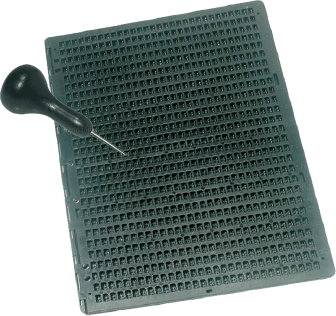
The Slate and Stylus (pictured right) are tools used by persons who are Blind to write text that they can read without assistance, it allows for a quick, easy, convenient and constant method of making embossed printing for Braille character encoding.
The basic design of the slate consists of two pieces of metal, plastic or wood fastened together with a hinge at one side. The back part of the Slate is solid with slight depressions spaced in braille cells of six dots each. The depressions are approximately 0.75 mm (0.030 in) deep and about 1.5 mm (0.059 in) in diameter. The horizontal and vertical spacing between dots within a cell is approximately 2.5 mm (0.098 in), while the distance between adjacent cells is about 4 mm (0.16 in).
The front of the Slate consists of rectangular windows that fit over the braille cells in the back. The inner rim of each window is provided with six indentations, which assist the user to position the stylus properly and press to form a dot. There are pins or posts in the back of the Slate positioned in non-cell areas to hold the paper in place and keep the top properly positioned over the back. The pins align with matching depressions on the opposite side of the slate. A slate as designed for a normal 8.5-inch piece of paper has 28 cells in each row. The rows can be any number, usually at least four. The Stylus is a short, blunted awl with a handle to fit comfortably the hand of the user.
The Slate and Stylus is a reasonably low cost and convenient means of writing braille and is available from Organisations such as Edit Microsystems and Sensory Solutions who sell them. You can contact them to receive a quote or find out more about this product.
3. Magnifiers
Magnifiers are not only handy Reading Aids for Persons with Visual Impairments but can also be useful for writing. Persons with a low or moderate Visual Impairment can read and wright with magnification aids, which might range from a simple Handheld Magnifying Glass to Hands Free Magnifiers, Electronic Magnifiers and Portable Video Magnifiers.
There are a variety of different types of Magnifiers that can be used as Reading and Writing Aids these assistive devices are available in South Africa from Companies and Organizations such as Sensory Solutions and Edit Microsystems who stock a variety of them, including:
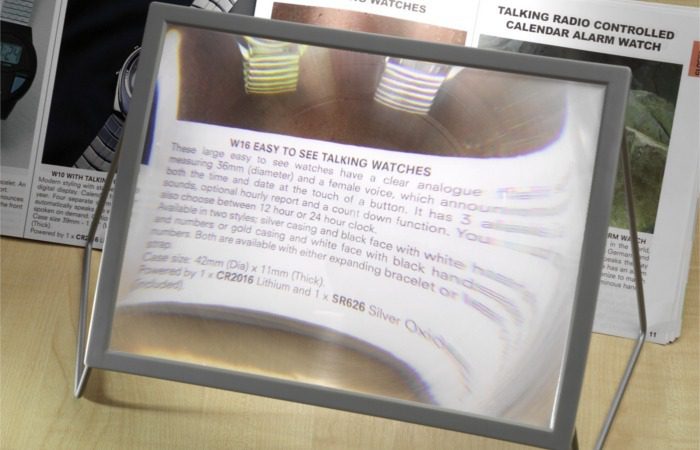
The A4 Sheet Magnifier: This magnifier has a 2x magnification and is ideal for magnifying books, magazines, paperwork, craft work and needle work. The magnifier comes with 2 stands and can be used as a hands-free device.
The stands are adjustable in height and allow viewing from a flat and angled perspective. The stands can be removed, and the magnifier can be folded for easy storage. Dimensions: 280 mm (W) x 210mm (L) x 14 mm (D).
The Magnifier is available to purchase from companies such as Edit Microsystems, contact them to find out more or receive a quote.
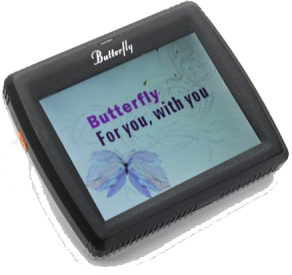
Butterfly Digital Magnifier: The Butterfly Digital Magnifier (pictured right) is a 3.5-inch handheld electronic magnifier which is designed for the people with low vision who are on the go. Because of its light weight and compact size, Butterfly can be hung around the neck or kept in the pocket, handbag or even purse.
The Butterfly is ideal for spot reading, such as from a price label, menu and or signs around you. 3.5-inch screen; Zoom in/out 1.5X to 15X magnification; Change colour mode (5 modes); Freeze frame/ Capture image.
The Butterfly Digital Magnifier is available to purchase from companies such as Edit Microsystems, contact them to find out more or receive a quote.
4. Braille Note Takers
Braille Notetakers are personal digital assistants for individuals who are Blind or Visually Impaired. Input is through a Perkins-style Braille keyboard or a standard QWERTY keyboard. Output is through an adjustable speech synthesizer, and some models include refreshable braille displays which can also provide refreshable braille when connected to a computer running popular screen reading programs.
There are a variety of different types of these products sold in South Africa including those listed below which are sold by companies such as Edit Microsystems, Blind SA and Sensory Solutions. They include the:
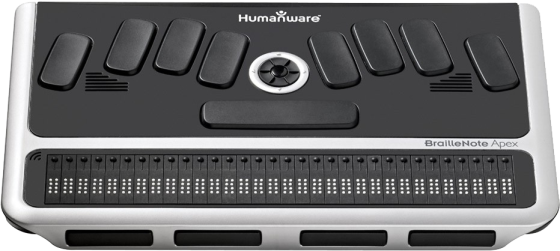
BrailleNote Apex BT 32 Braille Notetaker: This Braille Notetaker (pictured right) is an advanced device for braille users. It allows for efficient braille computing in a digital world through internet connectivity and ample storage capacity.
BrailleNote Apex BT 32 Braille Notetaker the Braillenote interface features a refreshable 32-pin braille display, full-size Perkin-style braille keyboard with thumb keys and a scroll wheel for increased comfort during long periods of reading and writing.
The Word Processor enables you to Create and edit text in different formats including Microsoft Word, it also translates between different grades of Braille, then print, emboss or attach to an e-mail. The Book Reader downloads eBooks and various text types and can be read in your preferred grade of Braille or speech. You can also listen to audio books and utilise DAISY navigation options. Web Browser and E-Mail: Use WiFi to connect to the internet, send and receive emails and stay connected using your preferred service provider.
The Braille Notetaker is available to purchase from companies such as Edit Microsytems, contact them to find out more or receive a quote.
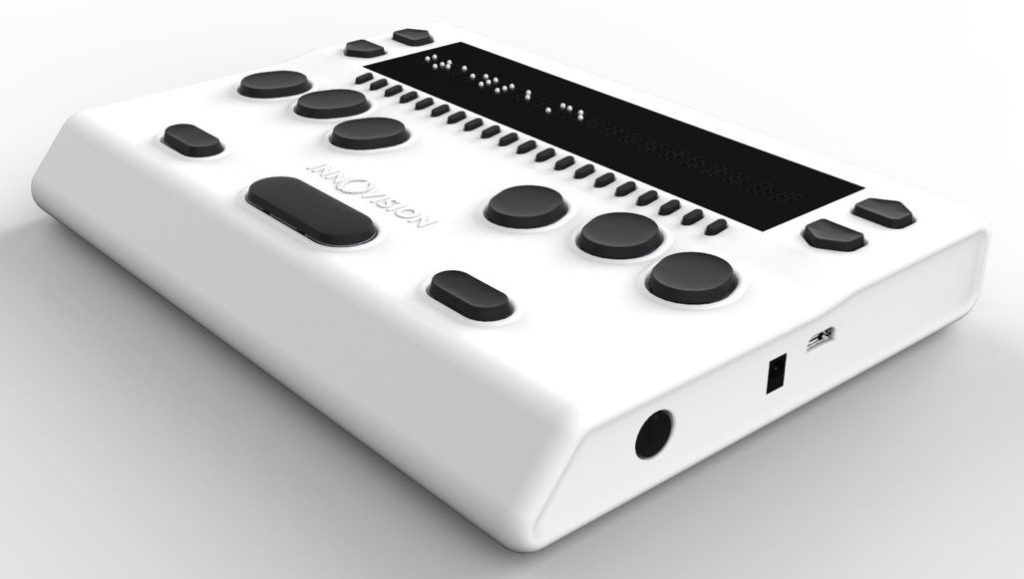
BrailleMe: “The convenient yet affordable braille display ”BrailleMe (pictured right) is a sleek, portable and lightweight smart braille display. It is a competent device specially designed for visually impaired students and professionals. The Touch of Genius Prize for Innovation was awarded to BrailleMe refreshable braille display, which will offer an affordable option for getting braille into the hands of as many blind people as possible.
The committee was impressed with how their unique engineering design produces quality braille at a very low cost. The BrailleMe uses a magnetic actuation with only one moving part to raise and lower braille dots. This simplifies the manufacturing process and eliminates many possible sources of failure compared to other existing braille display technologies. BrailleMe is a compact smart braille display with the following capabilities:
• 20 braille cells representing any six-dot braille code, in any language.
• Capable of reading the contents of files from an SD card under Stand-Alone mode.
• Connectivity to PCs and mobile devices via Bluetooth and USB
• A basic note-taking feature with internal braille translation
The BrailleMe operates in 2 ways –Standalone reader mode and remote mode:
Standalone reader mode: In this mode, BrailleMe displays the content of files stored on the inserted SD card. Braille Me allows you to browse files, read, edit, rename and delete them. BrailleMe has a built-in braille translator to support grade 1 and grade 2 translation and multi-language braille.
Remote mode: You can connect the device to a computer/ smartphone/ tablet using either Bluetooth or USB. Once connected, you can navigate, read and edit the content present on the connected device through BrailleMe seamlessly. You can also read books on your smartphone from Kindle, iBooks, Bookshare, etc.
The BrailleMe is available to purchase from companies and organisations such as Edit Microsystems and Blind SA (contact Ofentse Manyane at Blind SA on 011839 1793 or ofentse@blindsa.org.za)
5. Braille Embossers
A Braille Embosser is an impact printer that renders text as tactile Braille cells. Using Braille translation software, a document can be embossed with relative ease, making Braille production efficient and cost-effective. Braille Embossers usually need special Braille paper, which is thicker and more expensive than normal paper, but some high-end Embossers are capable of printing on normal paper.
Embossers can be either one-sided or two-sided. There are a variety of different types of these products sold in South Africa including those listed below which are sold by companies or Organizations such as, Edit Microsystems and Sensory Solutions. They include the:
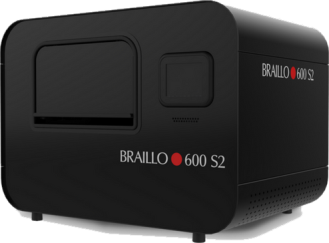
The Brailo 600 S2 Embosser (pictured right) is the faster, more robust counterpart to the Braillo 450 S2. Embossing at 600 CPS (1,800 pages per hour), it is the fastest continuous/fanfold embosser available, and it offers remarkable dot quality and dependability.
600 CPS (1,800 pages per hour) 24/7 Braille production, Superior Braille quality and reliability Scalable to a 600 SR as production needs increase Duxbury Braille Translator included free, Easy to setup & easy to service.
The Brailo 600 S2 is available to purchase from various companies or Organizations including, Edit Microsystems and Sensory Solutions to find out more or receive a quote.
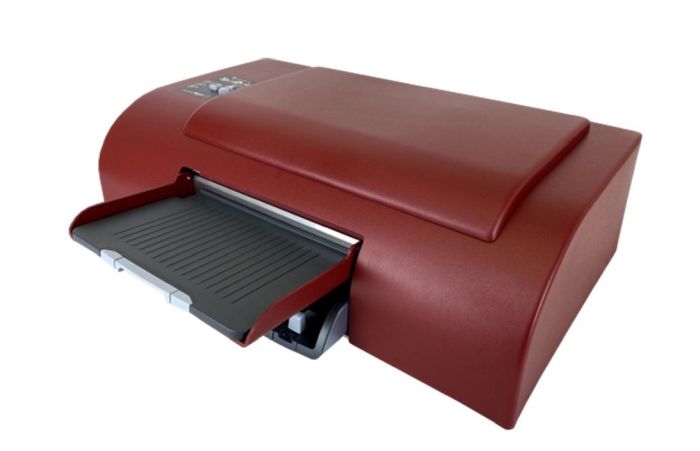
The Emprint SpotDot: This is the latest model of the Braille Embosser with a colour ink display and an all in one printer for the Blind Braille user. It is the perfect companion to the Braillenote Apex, the SpotDot enables you to print Braille graphics for a Blind user with a visual display for sighted persons. It has an easy to use operator panel with a tactile button and uses the same paper and ink cartridges as an HP Inkjet printer.
It prints Braille and ink on the same page and formats Word and Excel documents to Braille automatically. It creates raised visual images on paper from anything on the computer screen and includes Tiger Designer, which is a tactile graphics design software for Windows.
The Emprint SpotDot is available to purchase from various companies or Organizations including, Edit Microsystems to find out more or receive a quote.
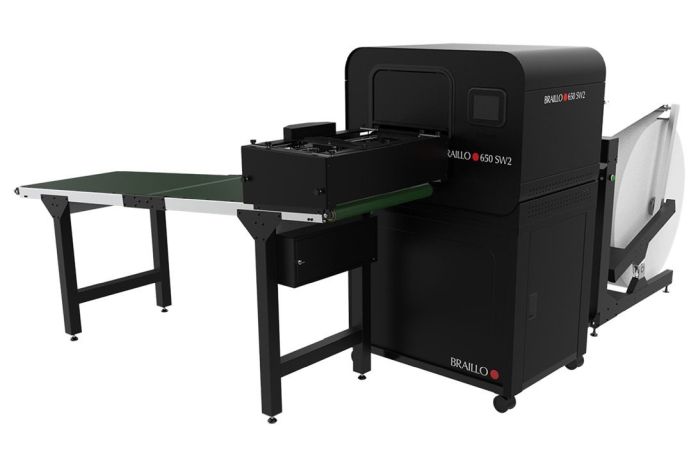
The Braillo 650 SW Embosser (pictured right) is a heavy-duty Embosser ideal for creating both Braille magazines and textbooks. Once the Brailled documents reach the conveyor belt, they are separated by “signatures” and the user will then remove and fold the sheets into magazine/book format (2-4 pages per sheet) ready for binding. Using paper rolls helps to save money on paper expenses and also eliminates the need for a burster and its operator.
This product creates superior Braille quality and reliability it Embossers 650 characters per second (1,950 pages per hour) and uses Braille paper rolls, allowing for less expensive and longer duration embossing.
The Braillo 650 SW is available to purchase from various companies or Organizations including, Edit Microsystems, contact them to find out more or receive a quote.
6. Braille Writers
A Braille writer is a machine that allows individuals who are blind or visually impaired to write in Braille. Braille writers typically consist of six keys, one for each of the six dots that make up a Braille cell, and a space bar. As the user presses the keys, a stylus punches the corresponding dots onto a sheet of paper, creating raised dots that can be read with the fingertips.
There are several types of Braille writers, including manual and electronic versions. Manual Braille writers require the user to physically press down on each key to create the dots, while electronic Braille writers use a variety of methods to create the dots, including a piezoelectric system that uses vibrations to create the dots.
Braille writers are an essential tool for individuals who are blind or visually impaired, as they allow them to communicate in written form, take notes, and perform other tasks that require written communication. They are widely used in schools, workplaces, and other settings where written communication is necessary.
These products are sold in South Africa by Organisations and Companies such as Blind SA, Sensory Solutions and Edit Microsystems. They include the:
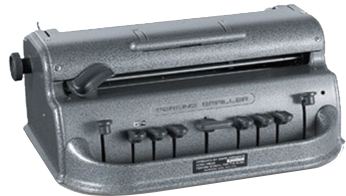
The Perkins Brailler is manual braille writer and a precision designed machine. The six keys each produce one of two dots in the braille cell and can together print the full alphabet in dots, as well as numbers represented by dots. The Perkins classic is still the most popular manual braille writer.
The Perkins Brailler is available to purchase from various companies or Organisations including, Blind SA and Sensory Solutions, contact them to find out more or to receive a quote.
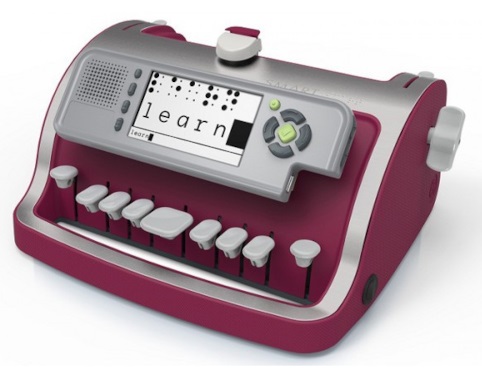
The SMART Brailler (pictured right) opens the door to a new, more intuitive way to communicate, teach and learn braille together. It has a video screen that displays SimBraille and Roman letters, combined with audio feedback for SMART Brailler instant, multisensory learning. The unit can edit, save and transfer electronic documents via USB.
Key Features include 26 lines with 28 cells on A4 paper; Built-in speaker and headphone output, male/female voice option; Screen size: 10.9 cm; Dimensions: 34 x 15 x 24 cm; Weight: 3.9 kg; Colours: raspberry, midnight blue and a 1-year warranty
The Smart Brailler is available to purchase from various companies or Organisations including Sensory Solutions and Edit Microsystems, contact them to find out more or to receive a quote.
You can contact Edit Microsystems to find out more or to receive a quote.
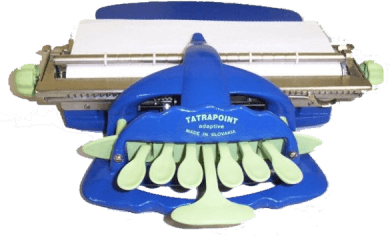
The Tatrapoint Mechanical Brailler (pictured right) is a manual six-key braille writer that is lightweight, reliably strong and requires minimum physical effort to write braille. It is easy on the wrists and is suitable for Braille users of all ages who will find it perfect for Braille writing for work or otherwise.
The spacing between keys can be adjusted to accommodate different hand sizes and positioning. The high contrast colour schemes make Tatrapoint features easier to find and appealing to younger users. This product includes a briefcase for transporting the Tatrapoint and documents. Tatrapoint Features include:
– Left and right margins can be set.
– A warning bell rings five cells before the end of a line.
– Carriage release and backspace key
– Can emboss on dymo tape.
– Precise paper transport for exact re-adjustment of corrections in previously written text.
These Brailles are available from various companies or Organizations including Edit Microsytems & Blind SA, contact them to find out more or to receive a quote. To place your orders with Blind SA, or for more information, please contact Ofentse Manyane on 079 871 7396 or Ria Vermaak on: 011 839 1793, Fax: 011 839 1217 or Email: accounts@blindsa.org.za.
You can contact Edit Microsytems to find out more or to receive a quote.
7. Voice Recorders
A Voice Recorder or a Dictation Machine is a device to record speech or other sounds and then play it back. Voice recorders are slim, portable gadgets that are used to create audio files that can later be downloaded onto a computer. They can be used to record discussions at meetings as well as notes, ideas, dictated letters and memos. Many students use them to record lectures so that they can write up proper notes later.
They are also very useful for Persons with disabilities, including Persons who are Visually Impaired or Blind. There are a variety of different types of these products sold in South Africa including those listed below sold by Organizations and Companies such as the South African National Council for the Blind and Edit Microsystems. They include the:
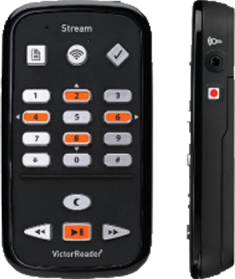
The Victor Reader Stream is a portable device similar to a media player for Visually Impaired and blind users. The compact device has a recorder, microphone and built in human sounding voice for assisting with text speech and voice replay. It has wireless connectivity enabling web access to rich media content, radio stations, audio films and video clips, online reference tools.
The Stream plays media formats such as MP3, MP4, EPUB and DAISY books. The battery is replaceable and recharges through your computer USB or USB AC adapter. The speaker and headphone jack assimilated into the device. It has user friendly voicing controls and a microphone to record voice notes, to-do lists, classroom lectures or from a line-in device. The user can control the reading speed with a forward and rewind button on the device. It has a sleep detection key which causes the playback to stop as soon as it senses no activity. The information key provides information of the present activity such as reading the book title, time elapsed / remaining, the total number of pages and chapters read, and it tracks your place and the stream resumes from where you left off.
The Victor Reader Stream is available to purchase from various companies or Organisations including, Edit Microsytems, contact them to find out more or receive a quote.
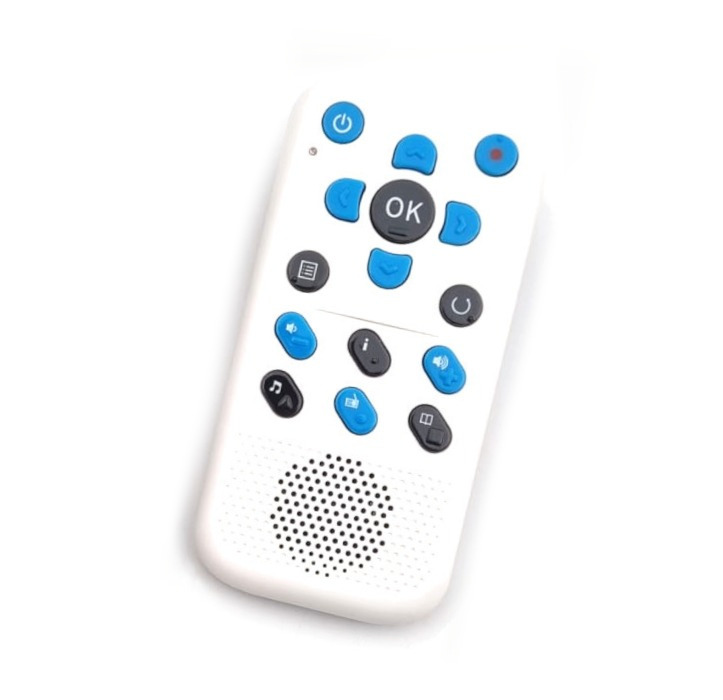
The Sensory PBRW (pictured right) is a portable multimedia player, e-book reader and voice recorder, allowing you to playback digital talking books or textbooks and to record lectures. It is a lightweight compact handheld electronic Sensory PBRW device fully accessible to visually impaired users, with voice guidance and a simple layout. The built-in high-quality IVONA text-to-speech engine not only offers guidance as you navigate through the different menus and applications on the device but also provides clear and articulated speech when reading e-books. These e-book formats include Microsoft Word DOC/DOCX files, EPUB and PDF files. The device supports the playback of DAISY 2.0 and 3.0 formats.
The Sensory PBRW is also a high-quality digital recorder, and offers other features like alarms, voice reminders, talking compass, calculator and more. The Sensory PBRW includes Wi-Fi capability, allowing to listen to Internet radio as well as podcast feeds. Key features include: Support DAISY 2.0 and 3.0; File formats: TXT, DOC/DOCX, HTM, HTML, EPUB, PDF; Audio formats: MP3, WMA, WAV, FLAC, APE, ACC, OGG, RA, M4A; Audio from video formats: RM, RMVB, AVI, MP4, 3GP, MOV, WMV, FLV, MPG, MPEG; Multiple navigation options; Comprehensive bookmarking; High-quality recording, built-in mic, line-in, noise cancellation; 8 GB internal memory, external memory up to 32 GB; Read from USB flash drive; Lithium rechargeable battery; USB charger and cable; Weight of 115 g and Compatibility with Windows 10, 8.1, 7.
The Sensory PBRW is available to purchase from various companies or Organisations including, Sensory Solutions, contact them to find out more or to receive a quote.
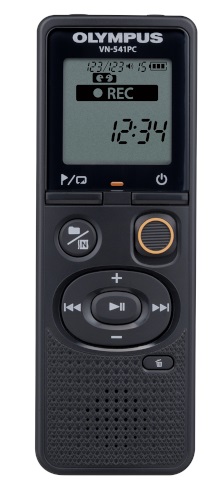
The OM System (previously Olympus) digital voice recorder (pictured right) is best used for recording lectures, meetings or capturing quick memos, with high-quality sound recordings made at the touch of a button. With its intuitive and quick dictation or recording features, the OM System is ideal for all everyday university environments. The ergonomic design allows for practical, one-handed operation.
Key features:
– Reader-friendly LCD display
– One-touch slide switch for direct recording
– Variable playback speed
– One-touch noise cancellation during playback
– Playback Speed Control: 2.0X – 0.5X
– 4 GB internal memory
– Power: 2 x AAA batteries
– Up to 60 hours battery life
The Sensory PBRW is available to purchase from various companies or Organisations including, Sensory Solutions, contact them to find out more or to receive a quote.