


Educationial and Therapeutic Aids
Many students have some type of visual problem, but the great majority of these cases can be resolved with Glasses or contact lenses. These students need no special education services, however some students with more serious Visual Impairments need extra assistance.
A student with a Visual Impairment can succeed in school if given the right support and accommodations and the teacher should understand these implications of Visual Impairments for learning and the modifications and accommodations that are essential for the student’s success.
Educators often classify students in terms of classroom functioning, students who are Blind or Visually Impaired are typically classified as moderate, severe, and profound. These classifications refer to the extent to which the student needs special education adaptations to learn. There are a wide range of Educational Aids that are available for students who are Blind or Visually Impaired and are available in a variety of categories to address functional capabilities of students with disabilities. This is what you need to know:
What Are You Looking For?
1. Where Can I Find Educational Assistive Devices
2. Types Of Educational Aids
A. Communication Aids
– Reading Aids
– Writing & Printing Aids
B. Computers & Electronic Aids
C. Sensory Aids
D. Sports & Hobbies Aids


Where Can I Find Educational Assistive Devices
There are a wide range of assistive technology devices that are available for students who are Blind or Visually Impaired. Some are considered “low tech” and inexpensive while others are more “high tech” and can be more expensive.
These Educational Aids are available throughout South Africa and can be purchased from various Organizations and Companies such as South African National Council for the Blind and Edit Microsystems. These Companies can also advise you on what Educational Aids would best suit your needs and supply the training you need.
Edit Microsystems (Pty) Ltd is an award-winning company that is devoted to finding alternative and state-of-the-art technical solutions to improve curriculum delivery in educational institutions and effective communication in business with a focus on high-speed functional connectivity and on-going support.
They have a proud tradition of innovation and are on the cutting edge of technological advances in education. Many of their products are designed to enhance interactivity in a classroom or lecture theatre.
Edit Microsystems are also a leader in finding and providing specially adapted hardware and software for Learners with Special Educational Needs throughout South Africa.
Edit Microsystems can be contacted on: 086 111 3973
Head Office: Cape Town – 13 Boy De Goede Circle, Table View, 7441.
They also have an online shop and branches in KwaZulu-Natal, Mpumalanga, Gauteng.
For more information: www.editmicro.co.za or email them at: info@editmicro.co.za.
Blind SA is a national Disable People’s Organisation (DPO) of the blind and for the blind. Established in 1946 as the South African Blind Workers Organisation (SABWO) and became Blind SA in 2004. Head office is situated at 5 Fuchs Street, Alrode, Alberton, however our services are rendered to blind and visually impaired in all provinces in South Africa
The vision of Blind SA is to do whatever is necessary or conducive to empower visually impaired people to become economically self-supporting and to live a full and meaningful life as citizens of South Africa.
The biggest challenges faced in our communities are the shortage of financial resources to enable our blind and visually impaired beneficiaries to reach their full potential as independent members of society.
The impact that Blind SA has had on the community is a more informed, empowered and enabled blind and visually impaired community. Because we have so many such people who are in serious need of our assistance, we would welcome the opportunity and resources to be able to reach more people with the view of creating a self-supporting, independent and informed blind and visually impaired community throughout South Africa.
“Our Purpose is to end the cycle of poverty for Blind South Africans, empowering them with knowledge and information through education, braille and developmental services and to break down barriers, provide opportunities and create answers that improve the quality of life for the blind community so that they can live the life they choose.”
Blind SA also stock and sell a variety of Assistive Devices to assist persons who are Blind, these include the Mali-Bhala, Tatrapoint Mechanical Brailler and Braille-Me. For any other requirements, contact Blind SA on:
Tel: +27 11 839 1793/4 or
Email: ceo@blindsa.org.za,
Jennine Pare – sales@blindsa.org.za,
Website: www.blindsa.org.za.
Address: 5 Fuchs Street, Alrode, Gauteng, South Africa.
Types of Educational and Developmental Aids
There are a wide range of Educational Aids that are available for students who are Blind or Visually Impaired and are available in a variety of categories to address functional capabilities of students with disabilities. Including:
A. Communication Aids
i. Reading Aids
Students who are blind or have Visual Impairments will typically need adaptations to access printed information that will allow the student to access all areas of the curriculum.
Material adaptation needs will vary, depending on the degree of functional vision, effects of additional disabilities, and the task to be done. Students may use Change in text size, spacing, color, background color or the use of pictures with text; adapted page turning; book stands; talking electronic dictionary; scanner with talking word processor; electronic text books; highlighted text; recorded material; multimedia presentation formats; books on tape, CD, or MP3; optical character reader; braille books; electronic magnifier (CCTV); or screen reader/text reader. braille, large print, print with the use of optical devices, regular print, tactile symbols, a calendar system, and/or recorded materials to communicate.
1.2. Other Types of Software
There is also a wide variety of other types of Software which is available to purchase from Companies such as Edit Microsystems, who can supply you with a wide range of pre-loaded software, including Microsoft Windows and Office, as well as various other programs that can assist persons with Mobility Impairments to operate a computer and type easily, such as:
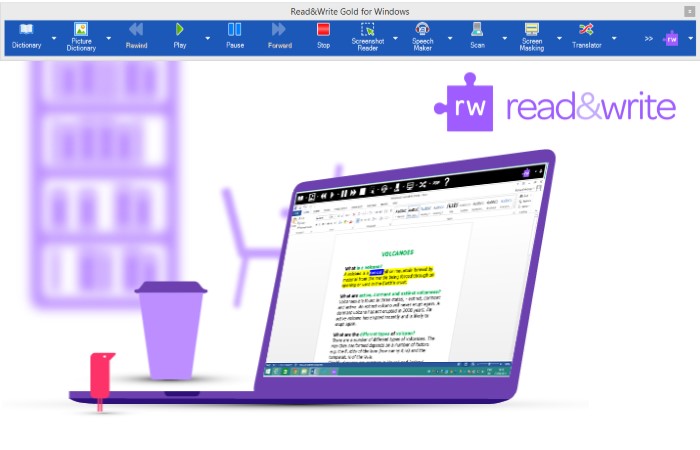
The TextHelp Read&Write Gold literacy Software for Dyslexia and Reading Difficulty is used by students and professionals around to world to assist them to overcome barriers to reading and writing. The toolbar supports individuals who struggle with literacy difficulties (including, but not limited to dyslexia).
The toolbar can also be useful to students with English as a second language, or even just for proof reading and productivity.
TextHELP Read&Write Gold is a discrete, easily customisable toolbar that that integrates reading, writing, studying, and research support tools with common applications such as Microsoft Word and internet browsers.
Read&Write Gold is suitable for your PC, Mac or iPad and is even available as a moblile flash stick application to be used on public use computers. Benefits of TextHELP Read&Write Gold include: Assists with reading fluency and comprehension; The software facilitates research, writing, studying, and test taking; The toolbar integrates with commonly used mainstream applications such as Microsoft Office; Encourages independence and inclusion in an inclusive education environment.
The Product Features include: Spell Checker; Word Prediction; Dictionary; Picture Dictionary; Word Wizard; Sounds like and Confusable words; Verb Checker; Calculator; Screenshot Reader; Speech Maker; Daisy Reader; Pronunciation Tutor; Scan: OCR/Scan a paper document to PDF, Word, HTML or ePub format; Fact Finder; Fact Folder; Fact Mapper; Screen Masking; Speech Input; Translator: You must be online to use this feature; PDF Aloud; Study Skills; Word Cloud and Voice Note.
The scanning and PDF aloud features of Read&Write Gold have made it highly popular as an exam reader. Students no longer need to have the question paper read aloud to them by a scribe or assistant, but can rather independently listen to the questions and have them repeated as necessary without having to ask for assistance. This feature has given dyslexic students around the world confidence and independence.
Contact Edit Microsytems to find out more about this Software and to receive a quote.

Clicker 8 is the complete writing solution for the primary and SEN classroom, providing every pupil with just the right level of support and challenge.
In addition to enhancing the core Clicker features that teachers know and love, Crick Software have added Clicker Cloze, Clicker Analytics, Picturize, and so much more! Clicker 8 combines exciting new feature ideas from Clicker fans with the inclusive literacy support tools already known and loved.
What’s new in Clicker 8?
Clicker 8 builds on the worldwide success of its award-winning predecessors.
It’s inclusive, it’s engaging, it’s intuitive, and it enables teachers to give every learner the personalised, evidence-led support they need to take their literacy skills to the next level.
Cloze activities are many a teacher’s go-to resource for comprehension exercises. They’re also fantastic for developing core reading and language skills. With Clicker Cloze, you can create a cloze activity using any text in just a few seconds. Complete within Clicker or print out for use away from the computer.
Contact Edit Microsytems to find out more about this Software and to receive a quote.
Edit Microsystems can also supply software such as Clicker 6 program for Primary schools and Yenka for high schools.
Please feel free to contact EditMicrosystems for more information.
To learn more about the Reading Aids that are available on the market today, Click Here.
ii. Writing & Printing Aids
Literacy is a key to personal independence and the access to information for Persons who are Blind.
Reading and Writing can only be attained through Braille, making it key to literacy.
Thanks to the availability of a variety of Printing Aids, Braille literature and printed materials are more readily available through Schools, Universities, Libraries, Organizations and Companies.
Writing Aids, and various techniques have been developed to assist persons who have Visual Impairments, so that they are able to Write or Sign. These Writing Aids can include simple assistive devices such as writing or signature guides, Slate and Stylus, paper with raised or bold lines or Special Pens.
The use of slant boards, and different types of magnification may also be helpful for those who are write print, while environmental adaptations include increasing contrast and lighting.
Recording Apps can be used to capture meetings, lectures or assist in composition of papers

Today there is a huge variety of assistive Computer, Computer Aids and Computer Software that has been developed to assist persons who are Blind or have Visual Impairments so they are not disadvantaged in School or at their job. A variety of these specialised Writing and Printing Aids are available in South Africa from companies like Edit Microsystems. To learn more about the various types of Writing and Printing Aids available on the market today, please click here.
B. Computer and Electronic Aids
Computers are Vital. Ensuring Access to Technology is a must for anyone to – but especially so for those with sensory impairments.
Due to shortage of funds, many schools are using outdated equipment. but students with visual impairments will not operate functionally on old or outdated equipment.
If funds are tight you may need to seek alternative sources for funding. There are companies that can help. It takes a lot of perseverance and effort, but its well worth it.
Drawing Software
There are a variety of different types of Educational Computer Software especially made to help persons who are Blind or who have Visual Impairments, some of this software that is sold in South Africa, is used to teach children how to recognize and draw shapes. which are easier to operate by Persons who are Blind or have Visual Impairments, including the following which is sold by Edit Microsystems.